4.7

V2rayU
V2rayU, v2ray mac , , swift , trojan,vmess,shadowsocks,socks5 , , , , ,
SHARE
Screenshots (6)
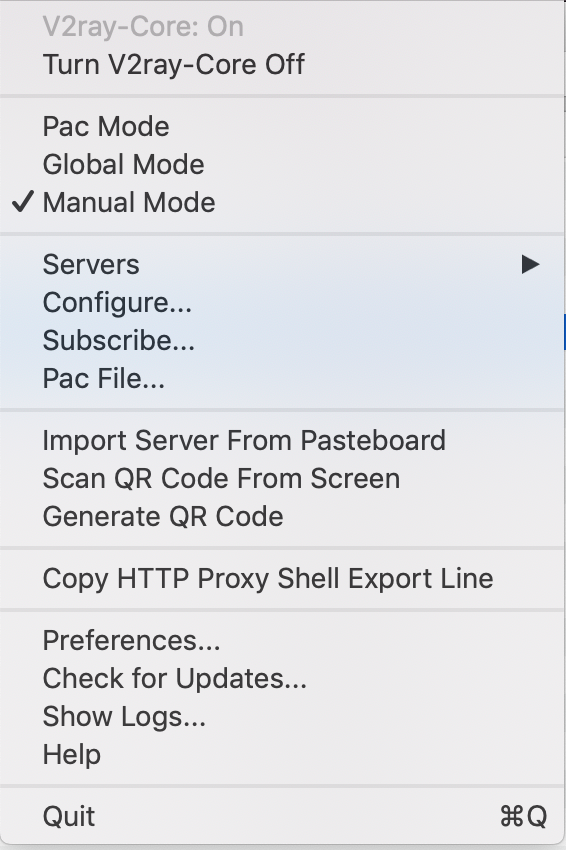
Screenshot 1 of 6
Overview
V2rayU (V2ray-macOS) is a popular, full-featured open-source V2Ray / Xray graphical client written natively in Swift for macOS. Engineered with full native Apple Silicon & Intel binary support, V2rayU seamlessly handles VMess, VLESS, Trojan, Shadowsocks, and Socks5 nodes alongside system PAC rules, TUN virtualization, clipboard imports, and QR code scanning.
How It Works
V2rayU operates through structured, deterministic execution stages:
Multi-Protocol Core Orchestration: Embeds V2Ray and Xray binaries to establish encrypted VMess, VLESS, Trojan, Shadowsocks, and Socks5 tunnels seamlessly.
Flexible System Routing Modes: Toggles dynamically between PAC rule filtering, Global Proxy forwarding, and TUN virtual network interfaces from the status bar.
Clipboard, QR & Subscription Syncing: Parses server configuration URIs, captures screen QR codes, and refreshes remote subscription lists with health latency checks.
Unified macOS Universal Build: Ships native Apple Silicon ARM64 and Intel x86_64 binaries paired with system Keychain integration.
Key Technical Features & Capabilities
Multi-Protocol Core Integration: Orchestrates V2Ray and Xray core binaries seamlessly for VMess, VLESS, Trojan, Shadowsocks, and SOCKS5 connections.
PAC, Global & TUN Traffic Modes: Switches smoothly between smart PAC domain routing, global proxy forwarding, and system-wide TUN interface capture from the status bar.
Subscription Feeds, QR Codes & Clipboard Import: Decodes
vmess://, vless://, and trojan:// clipboard URIs, scans screen QR codes, and refreshes remote node subscriptions automatically.Real-Time Speed & Latency Diagnostics: Benchmarks node ping latencies cleanly and renders upload/download throughput directly in the menu bar.
Architecture & Technology Stack
Primary Languages: Swift, AppleScript
UI & Networking: Cocoa / AppKit, NetworkExtension / TUN, Embedded V2Ray/Xray Core
Build System: Xcode (
V2rayU.xcodeproj)Supported Platforms: macOS 12+ (Apple Silicon ARM64 & Intel x86_64 DMGs)
System Requirements
| Specification | Minimum Requirement | Recommended Specification |
|---|---|---|
| Operating System | macOS 12.0+ (Apple Silicon & Intel) | Latest stable release build |
| Processor Architecture | 4-Core x86_64 or Apple Silicon M1 | 8-Core Apple Silicon / Core i7+ |
| Memory (RAM) | 4 GB Unified Memory | 16 GB+ High-Speed RAM |
| Disk Space | 1 GB free SSD storage | 5 GB+ free SSD storage |
Installation & Setup Guide
macOS Installation
1
Download the matching DMG directly from CookApps:
Apple Silicon (M1-M4):
V2rayU-arm64.dmgIntel Macs:
V2rayU-64.dmg2
Drag
V2rayU.app to /Applications and select a node or import your subscription URL from the menu bar icon.Building from Source
bash
git clone -b main https://github.com/yanue/V2rayU.git
cd V2rayU
open V2rayU.xcodeproj
How to Use & Workflow
1
Import Proxy Nodes: Choose Import Server From Clipboard, Scan QR Code From Screen, or paste a remote subscription link under Subscriptions.
2
Choose Routing Mode: Select PAC Mode (rule-based domain bypass), Global Mode, or Manual Mode from the menu bar.
3
Verify Node Latency: Run Ping All Servers and pick the lowest-latency endpoint.
Troubleshooting & Common Issues
Issue: macOS alerts "V2rayU is damaged" or unverified developer on first open.
*Cause*: macOS Gatekeeper quarantine flag attached to unnotarized open-source DMG download.
*Resolution*: Clear quarantine via Terminal:
xattr -cr /Applications/V2rayU.app, then relaunch normally.**Issue: Terminal commands (
curl, git) ignore active V2rayU proxy.***Cause*: macOS System Proxy settings apply primarily to GUI/CFNetwork apps rather than raw shell sessions.
*Resolution*: Click Copy Shell Export Command inside the V2rayU menu bar dropdown to configure
http_proxy/https_proxy in Terminal.How to Use & Getting Started
## Installation & Setup Guide
### macOS Installation
1. Download the matching DMG directly from CookApps:
- **Apple Silicon (M1-M4)**: `V2rayU-arm64.dmg`
- **Intel Macs**: `V2rayU-64.dmg`
2. Drag `V2rayU.app` to `/Applications` and select a node or import your subscription URL from the menu bar icon.
### Building from Source
```bash
git clone -b main https://github.com/yanue/V2rayU.git
cd V2rayU
open V2rayU.xcodeproj
```
Ready to run V2rayU?
100% Free & Open-Source native desktop software. Star the repository to support development.