
Screenshots (2)
Screenshot 1 of 2
Overview
SwitchHosts is a popular, cross-platform open-source utility built on Tauri, Rust, and React for managing and toggling **/etc/hosts** configurations safely. Engineered for full-stack developers, SwitchHosts organizes local entries, remote HTTPS host subscriptions, and grouped DNS overrides behind one crisp visual interface and instant system tray switcher.
How It Works
SwitchHosts operates through structured, deterministic execution stages:
**Profile-Based
/etc/hosts Multiplexing**: Organizes DNS overrides into local groups, cloud URLs, and composite project profiles for rapid environment switching.Real-Time Tray Toggling: Enables or disables individual hosts rules straight from the macOS menu bar or Windows/Linux tray icon without manual
sudo vi edits.Automated Remote Sync Subscriptions: Refreshes shared staging or ad-blocking hosts feeds on scheduled intervals with checksum diffing.
Rust & Tauri Security Engine: Isolates privileged writes via audited Tauri IPC hooks paired with syntax-highlighted hosts validation.
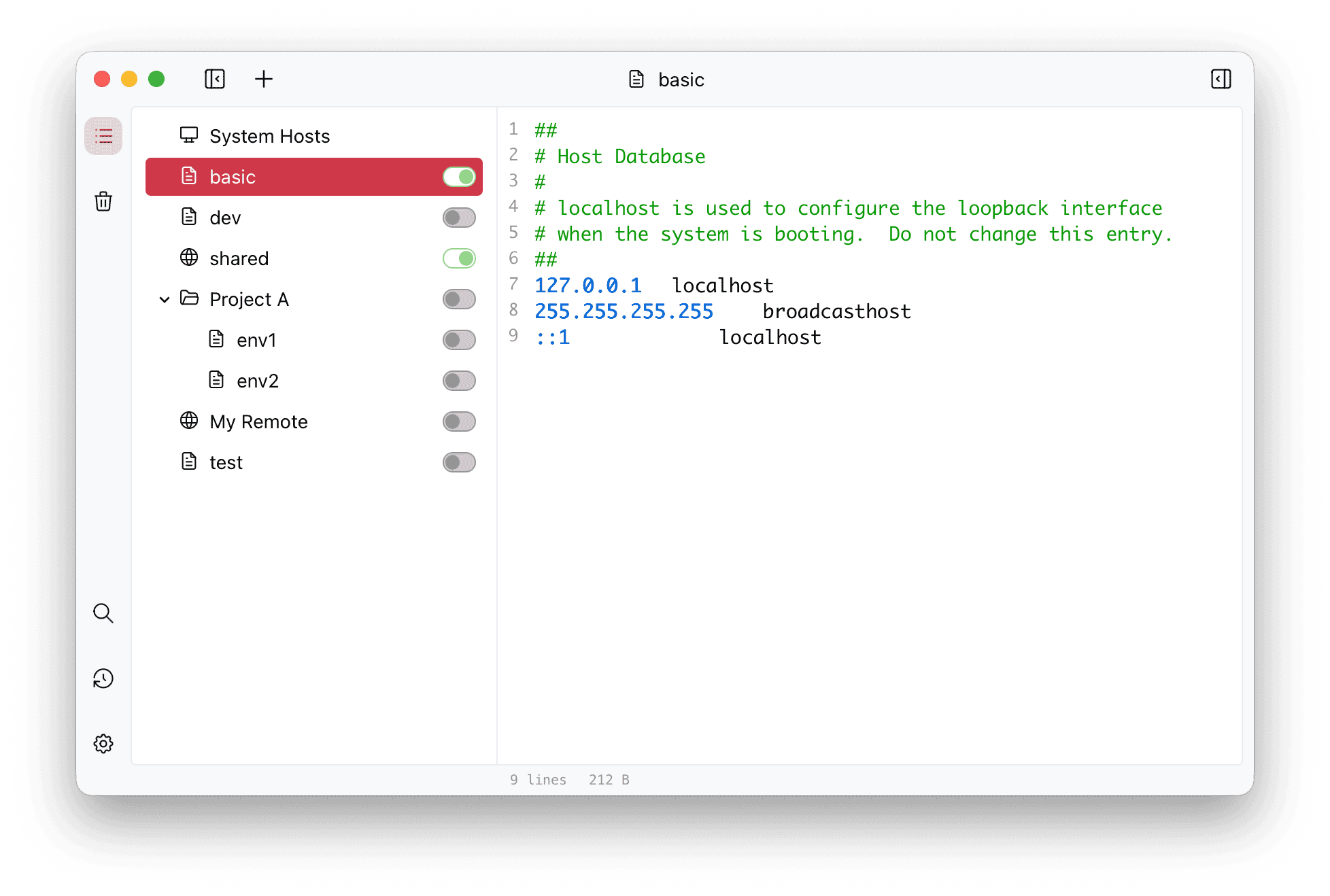
SwitchHosts graphical hosts profile manager with syntax highlighting
Key Technical Features & Capabilities
Multi-Profile & Group Switching: Organize staging, production, microservices, and ad-blocking host overrides into toggleable groups and folders.
Instant System Tray Menu: Activate or deactivate host configurations in one click straight from the macOS menu bar or Windows/Linux tray.
Automated Remote URL Subscriptions: Fetch remote team host files periodically via HTTPS with customizable refresh schedules.
Native Tauri + React UI: Combines CodeMirror syntax highlighting, find-and-replace, instant history backups, and fast Rust file I/O.
Architecture & Technology Stack
Primary Languages: Rust (Tauri Core), TypeScript, React 18
Frameworks & State: Tauri, Jotai State Management, Mantine UI, CodeMirror
Build Systems: Cargo, Vite, npm / pnpm
Supported Platforms: macOS (Apple Silicon & Intel Universal DMG), Windows (x64 & ARM64), Linux
System Requirements
| Specification | Minimum Requirement | Recommended Specification |
|---|---|---|
| Operating System | macOS (Universal DMG), Windows 10/11 (x64 & ARM64), Linux | Latest stable release build |
| Processor Architecture | 4-Core x86_64 or Apple Silicon M1 | 8-Core Apple Silicon / Core i7+ |
| Memory (RAM) | 4 GB Unified Memory | 16 GB+ High-Speed RAM |
| Disk Space | 1 GB free SSD storage | 5 GB+ free SSD storage |
Installation & Setup Guide
macOS & Windows Installation
macOS: Download
SwitchHosts-5.0.3-mac-universal.dmg or run brew install --cask switchhosts.Windows: Run
SwitchHosts-5.0.3-windows-x64-setup.exe (or ARM64 setup on Snapdragon devices).Building from Source
bash
git clone https://github.com/oldj/SwitchHosts.git
cd SwitchHosts
npm install
npm run tauri dev
How to Use & Workflow
1
Create Local Hosts Group: Click + in the sidebar to define a named profile (e.g.
Local Dev API).2
Write or Sync Entries: Add
127.0.0.1 api.staging.local lines with syntax highlighting or subscribe to a shared remote HTTPS hosts URL.3
Toggle Active Rules: Flip the profile switch in the main window or menu bar tray and enter system authorization once if writing to
/etc/hosts.Troubleshooting & Common Issues
Issue: Hosts modifications fail to take effect in Google Chrome or Safari.
*Cause*: Operating system DNS caches or browser DNS-over-HTTPS (DoH) caches hold old IP mappings.
*Resolution*: Flush macOS DNS cache (
sudo dscacheutil -flushcache; sudo killall -HUP mDNSResponder) or disable Secure DNS for local test domains.How to Use & Getting Started
## Installation & Setup Guide
### macOS & Windows Installation
- **macOS**: Download `SwitchHosts-5.0.3-mac-universal.dmg` or run `brew install --cask switchhosts`.
- **Windows**: Run `SwitchHosts-5.0.3-windows-x64-setup.exe` (or ARM64 setup on Snapdragon devices).
### Building from Source
```bash
git clone https://github.com/oldj/SwitchHosts.git
cd SwitchHosts
npm install
npm run tauri dev
```
Ready to run SwitchHosts?
100% Free & Open-Source native desktop software. Star the repository to support development.