4.9
QuickRecorder
A lightweight screen recorder based on ScreenCapture Kit for macOS / ScreenCapture Kit macOS
SHARE
Screenshots (2)
Screenshot 1 of 2
Overview
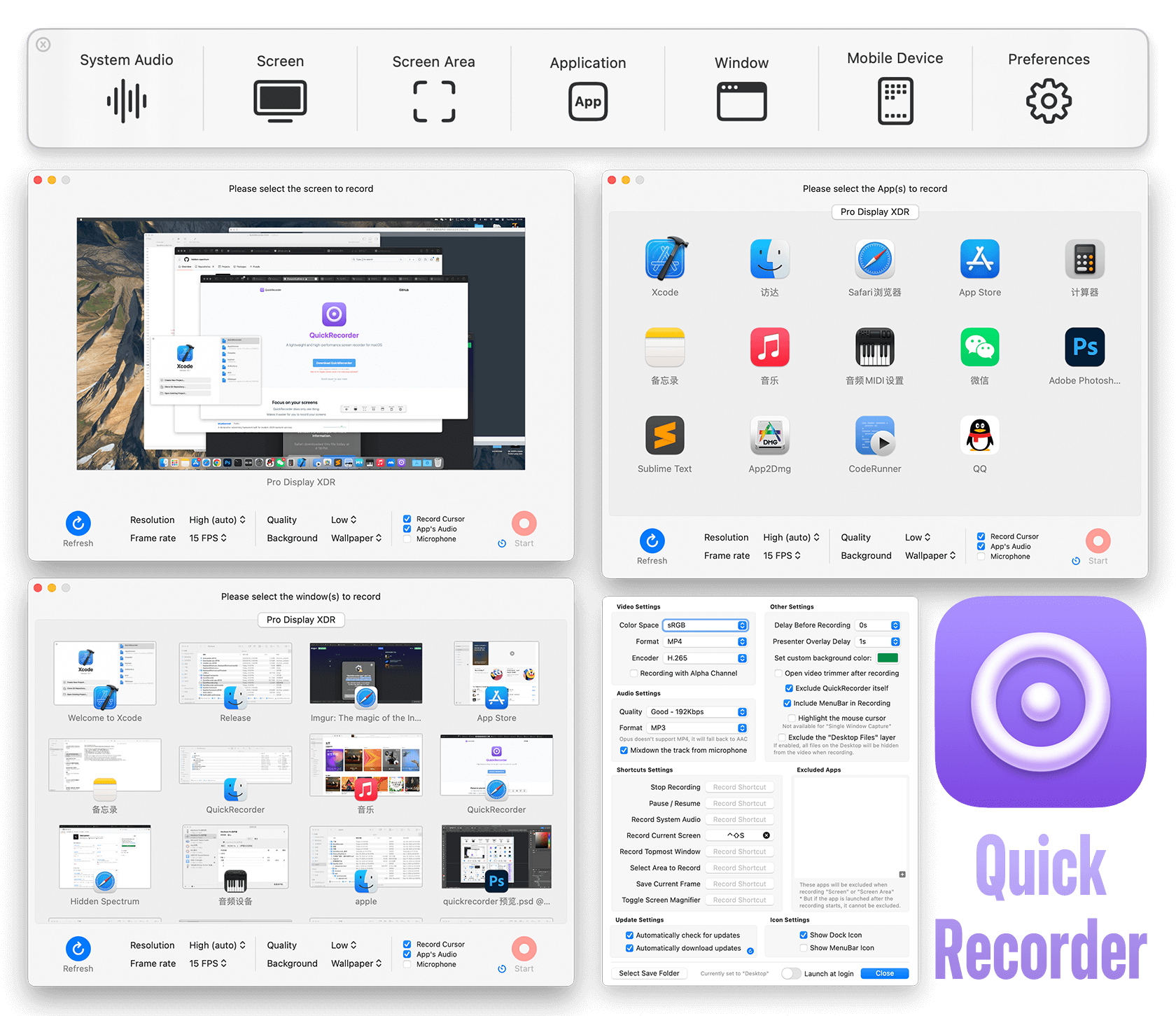
QuickRecorder is a lightweight, high-performance macOS screen recorder engineered directly on top of Apple's ScreenCaptureKit API. Built natively in SwiftUI, it supports multi-monitor capture, window/application isolation, iOS device recording, driver-free system audio loopback, real-time Presenter Overlay, and HEVC with Alpha transparency.
How It Works
QuickRecorder operates through structured, deterministic execution stages:
ScreenCaptureKit Hardware Pipeline: Captures crisp 4K/60fps display, window, application, or connected iOS device feeds via Apple's native ScreenCaptureKit framework.
Driver-Free Loopback Audio Capture: Records system and per-application internal audio streams natively without installing virtual audio kernel extensions.
Presenter Overlay & Alpha Video: Composites live camera feeds seamlessly on macOS 14+ and supports HEVC with Alpha transparency for nonlinear editors.
Interactive Cursor & Zoom Aids: Enhances recordings with real-time mouse highlight rings, screen magnification lenses, and window selection controls.
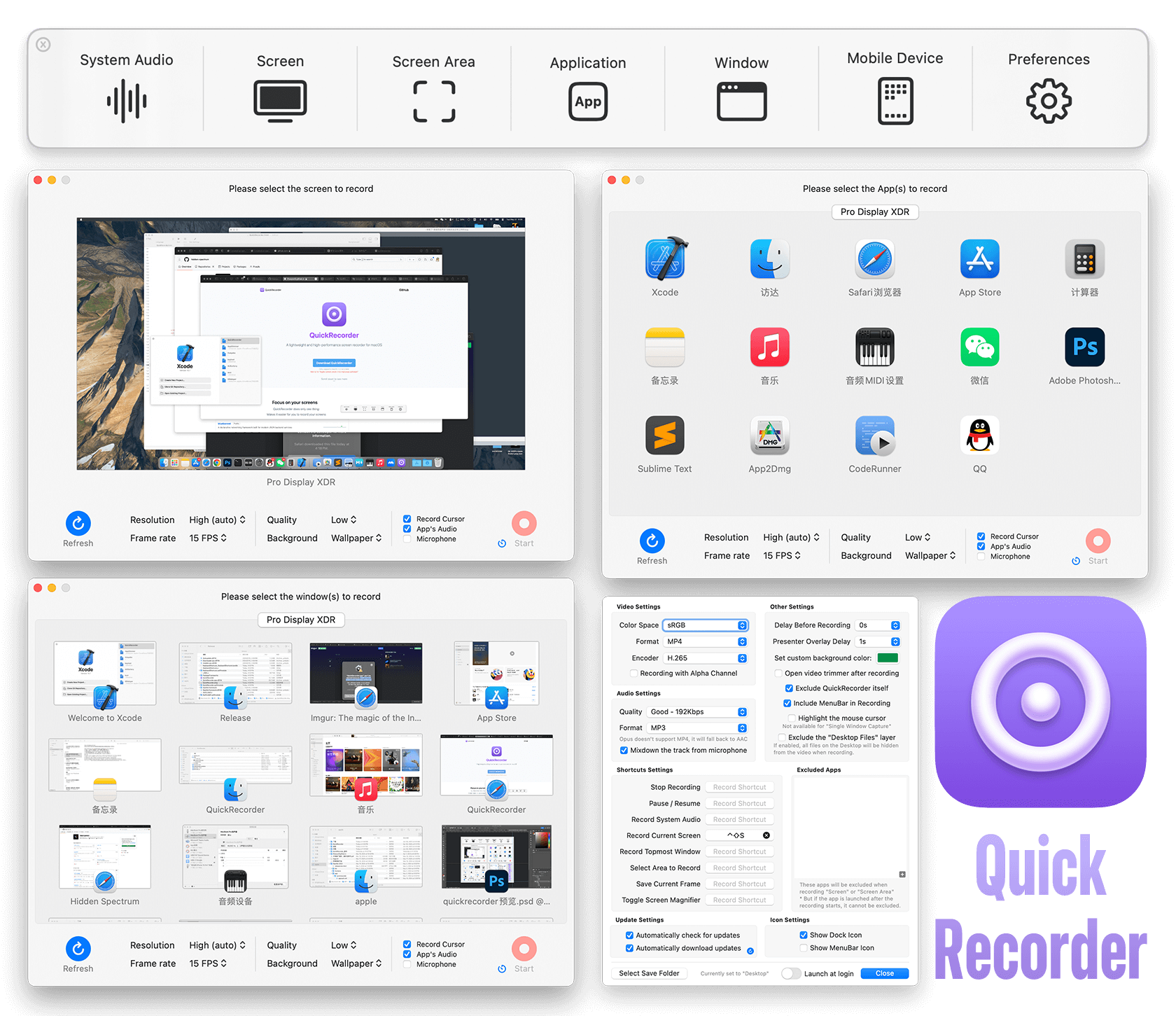
QuickRecorder macOS screen capture and audio loopback interface
Key Technical Features & Capabilities
ScreenCaptureKit Hardware Efficiency: Captures full 60fps retina displays, specific app windows, or wired iPhone/iPad screens with minimal CPU and thermal load.
Driver-Free Internal Audio Capture: Captures clean application audio streams directly via macOS frameworks without installing fragile virtual sound drivers.
HEVC with Alpha & Presenter Overlay: Records transparent background video streams ready for Final Cut Pro / iMovie and overlays your live webcam feed seamlessly.
Mouse Highlights & Magnifier: Highlights mouse clicks with visual rings, magnifies regions during tutorials, and hides desktop icons automatically on record.
Architecture & Technology Stack
Primary Languages: Swift, SwiftUI, Objective-C Bridges
System Frameworks: Apple ScreenCaptureKit, AVFoundation, CoreAudio / AudioToolbox
Output Encoders: Hardware VideoToolbox H.264, HEVC (H.265), HEVC with Alpha, MP4/MOV
Supported Platforms: macOS 12.3 Monterey or later (Apple Silicon & Intel)
System Requirements
| Specification | Minimum Requirement | Recommended Specification |
|---|---|---|
| Operating System | macOS 12.3+ (Apple Silicon & Intel) | Latest stable release build |
| Processor Architecture | 4-Core x86_64 or Apple Silicon M1 | 8-Core Apple Silicon / Core i7+ |
| Memory (RAM) | 4 GB Unified Memory | 16 GB+ High-Speed RAM |
| Disk Space | 1 GB free SSD storage | 5 GB+ free SSD storage |
Installation & Setup Guide
macOS Installation
1
Download the verified
.dmg package directly from CookApps or install via Homebrew: brew install lihaoyun6/tap/quickrecorder.2
Drag
QuickRecorder.app into /Applications.3
Grant Screen & System Audio Recording permission on first launch under System Settings › Privacy & Security.
Building from Source
bash
git clone https://github.com/lihaoyun6/QuickRecorder.git
cd QuickRecorder
open QuickRecorder.xcodeproj
How to Use & Workflow
1
Select Capture Source: Choose Screen, Area, Window, Application, Audio Only, or connected Mobile Device from the compact control panel.
2
Tune Audio & Camera: Toggle Microphone, System Audio, or macOS Presenter Overlay webcam floating mode before starting capture.
3
Record with Real-Time Controls: Trigger recordings via global hotkeys and pause/resume seamlessly from the menu bar status icon.
4
Save High-Efficiency Video: Inspect completed MP4/MOV clips directly inside your configured output directory.
Troubleshooting & Common Issues
Issue: macOS prompts repeatedly or captures a blank desktop wallpaper.
*Cause*: macOS Screen Recording permission or System Audio Recording permission has not been enabled for QuickRecorder.
*Resolution*: Open System Settings › Privacy & Security › Screen & System Audio Recording, toggle QuickRecorder on, and restart the app.
Issue: Presenter Overlay mode is disabled in preferences.
*Cause*: Apple's hardware Presenter Overlay pipeline requires macOS 14 Sonoma or newer on Apple Silicon Macs.
*Resolution*: Enable the classic floating camera window option on macOS 12/13 systems.
How to Use & Getting Started
## Installation & Setup Guide
### macOS Installation
1. Download the verified `.dmg` package directly from CookApps or install via Homebrew: `brew install lihaoyun6/tap/quickrecorder`.
2. Drag `QuickRecorder.app` into `/Applications`.
3. Grant **Screen & System Audio Recording** permission on first launch under **System Settings › Privacy & Security**.
### Building from Source
```bash
git clone https://github.com/lihaoyun6/QuickRecorder.git
cd QuickRecorder
open QuickRecorder.xcodeproj
```
Ready to run QuickRecorder?
100% Free & Open-Source native desktop software. Star the repository to support development.