MixMusic is a native desktop player for YouTube Music and Spotify on macOS, Windows and Linux with Community Themes and Plugins. iOS and Android Coming Soon.
SHARE
Screenshots (3)
Screenshot 1 of 3
Overview
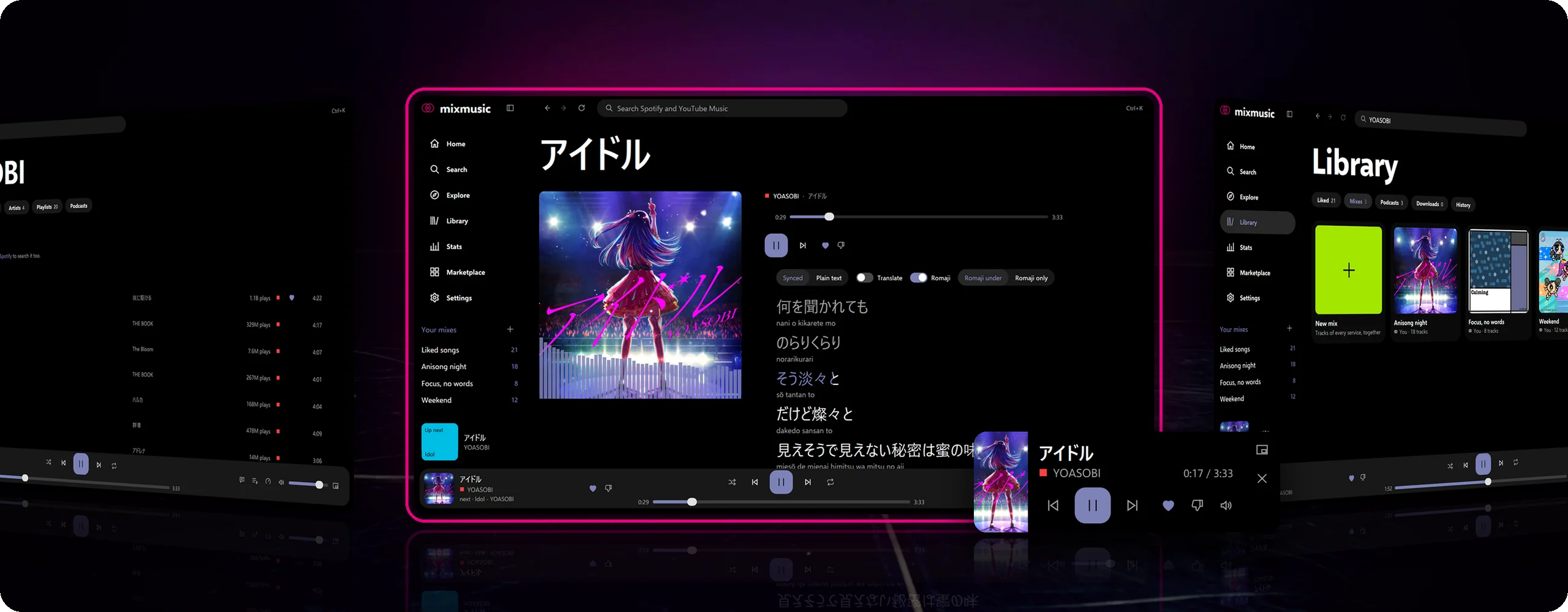
MixMusic is a fast, native cross-platform desktop music player unifying YouTube Music and Spotify inside one lightweight Go binary. Built with MyGo native GPU windowing (zero Chromium/Electron overhead), MixMusic combines both streaming catalogs into unified search results, mixed cross-service playlists, synced & romanized lyrics, a 10-band equalizer, offline audio caching, and a sandboxed TypeScript/JavaScript plugin ecosystem.
How It Works
MixMusic operates through structured, deterministic execution stages:
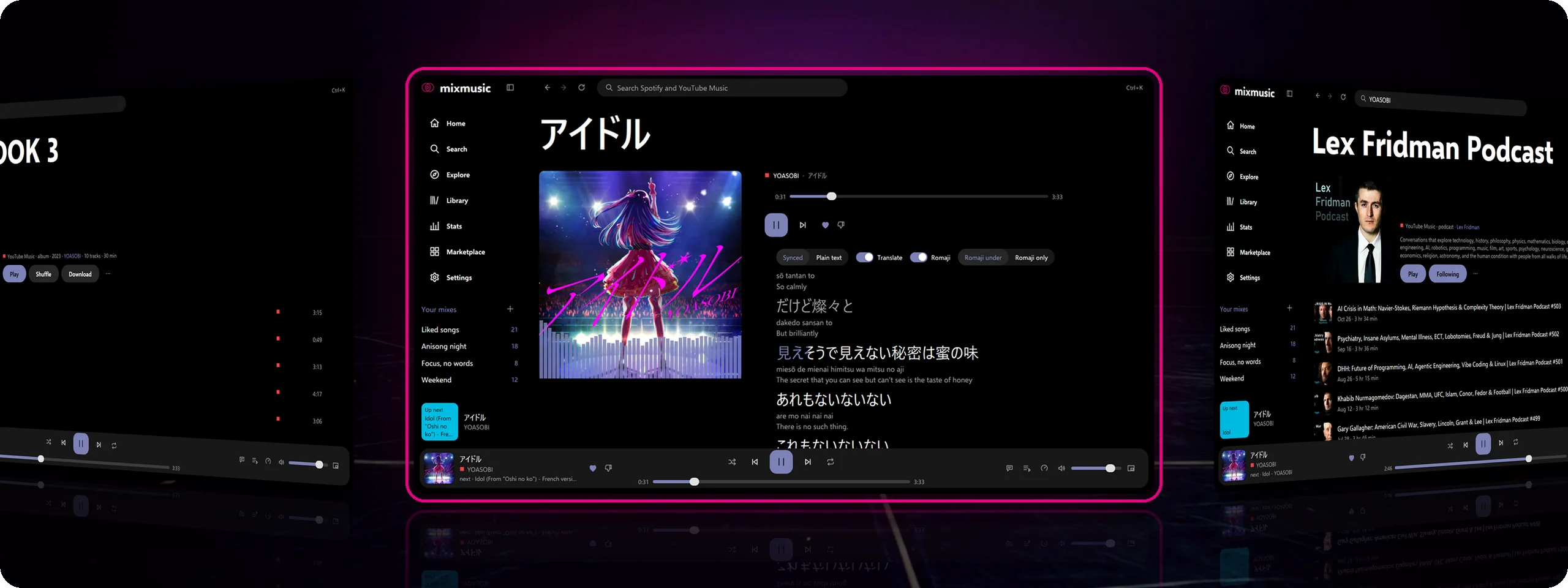
Dual-Catalog Unified Search: Searches YouTube Music and Spotify simultaneously with play counts to distinguish original studio masters from covers, working immediately with zero account required for YouTube Music.
Interleaved Crossfade Queue & Mixed Playlists: Queues Spotify and YouTube Music tracks inside one shared playlist with crossfading, loudness leveling, 10-band EQ, and auto-continuing radio.
Pure-Go Native GPU Audio Engine: Draws every interface natively on the GPU via MyGo with pure-Go Opus, AAC, and AC-3 decoders, synced lyrics (LRCLIB/Unison + kagome kanji-to-romaji), and process audio loopback visualization.
Four Layouts, Fourteen Themes & Plugin Sandbox: Switches between Blend, Expressive, Crate, and Tiles layouts alongside Sobek-sandboxed JavaScript community plugins and Material HCT cover-derived palettes.
MixMusic's pages in the Blend layout, standing upright on a dark stage and facing you: now playing アイドル by YOASOBI in the middle, outlined in pink, each line of its lyrics with romaji and an English translation under it; the album THE BOOK 3 on the left and a followed podcast's page on the right
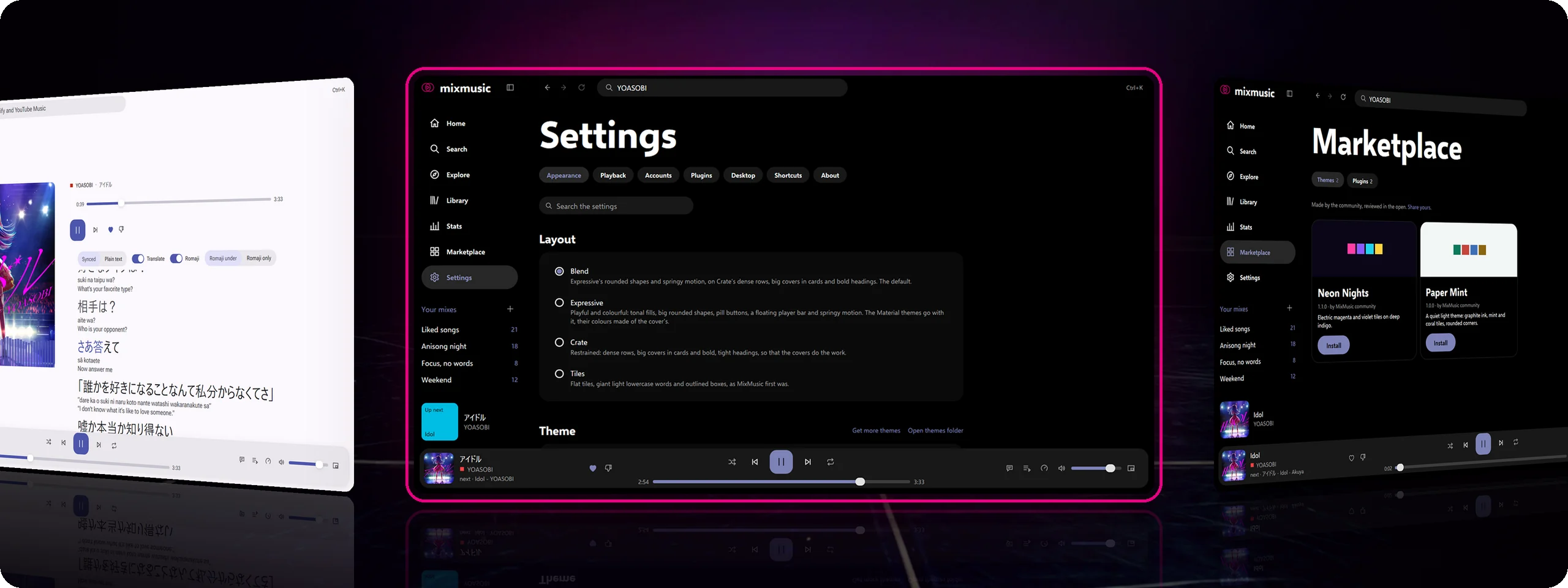
More of MixMusic, standing upright on a dark stage and facing you: Settings › Appearance with the four layouts in the middle, outlined in pink; a Material theme coloured by the cover that plays on the left, and the marketplace's community themes on the right
Key Technical Features & Capabilities
Dual-Service Search & Mixed Playlists: Searches YouTube Music and Spotify side by side, disambiguating studio releases from covers via view counts while interleaving tracks from both services into one continuous queue.
Zero-Account Instant YouTube Music & Optional Spotify: Plays YouTube Music immediately on launch with no sign-in required, and supports Spotify playback natively, via Spotify Connect, or matched seamlessly to YouTube Music audio.
Pure-Go GPU Rendering & Custom Audio Codecs: Ships native Opus, AAC-LC, AC-3/E-AC-3 decoders, Kaiser-windowed sinc resamplers, process audio loopback visualizers, and offline encrypted credential storage in one native executable.
Layouts, Themes & Typed Plugin Marketplace: Customize appearance with 4 responsive layouts (Blend, Expressive, Crate, Tiles), 14 built-in themes (plus Material HCT cover-extracted palettes), Last.fm scrobbling, Discord Rich Presence, and community plugins.
Architecture & Technology Stack
Primary Languages: Go 1.27.3, TypeScript (Plugin SDK & Community Extensions)
Supported Platforms: macOS 12+ (Universal Apple Silicon & Intel), Windows 10/11 (x64 & ARM64), Linux (Flatpak, AppImage, .deb, .rpm)
System Requirements
Specification
Minimum Requirement
Recommended Specification
Operating System
macOS 12+ Universal, Windows 10/11 (x64 & ARM64), Linux
Latest stable release build
Processor Architecture
4-Core x86_64 or Apple Silicon M1
8-Core Apple Silicon / Core i7+
Memory (RAM)
4 GB Unified Memory
16 GB+ High-Speed RAM
Disk Space
1 GB free SSD storage
5 GB+ free SSD storage
Installation & Setup Guide
2 Redit
macOS & Windows Installation
macOS: Download mixmusic-0.5.10-macos-universal.dmg, drag to /Applications, and run xattr -dr com.apple.quarantine /Applications/MixMusic.app if Gatekeeper prompts on first launch.
Windows: Run mixmusic-0.5.10-windows-amd64-setup.exe (or arm64-setup.exe on Snapdragon devices); requires built-in WebView2 only when signing in to Google/Spotify pages.
Building from Source
bash
git clone https://github.com/fzn0x/mixmusic.git
cd mixmusic
bun install
bun run dev
Installation & Setup Guide
Mở khóa ứng dụng để xem chi tiết hướng dẫn cài đặt, cấu hình môi trường và vận hành.
How to Use & Workflow
2 Redit
1
Start Playing Immediately: Launch MixMusic to search trending tracks, albums, and podcasts across YouTube Music with zero login required.
2
Link Optional Services: Connect YouTube Music, Spotify, or Last.fm under Settings › Accounts using your system keyring for encrypted token storage.
3
Customize Layouts & Audio DSP: Press Ctrl+K / Cmd+K for Command Palette navigation, dial in presets on the 10-band equalizer, or toggle dynamic Material artwork themes.
4
Install Community Plugins: Open the in-app Marketplace to install community UI themes, sleep timers, and visualizer widgets.
How to Use & Workflow
Mở khóa ứng dụng để xem chi tiết hướng dẫn cài đặt, cấu hình môi trường và vận hành.
Troubleshooting & Common Issues
Issue: macOS reports unverified developer quarantine warning on first open.
*Cause*: Upstream macOS release binaries are not yet notarized by Apple.
*Resolution*: Open via System Settings › Privacy & Security › Open Anyway or run xattr -dr com.apple.quarantine /Applications/MixMusic.app.
Issue: Audio stream fallback required on restricted YouTube tracks.
## Installation & Setup Guide
### macOS & Windows Installation
- **macOS**: Download `mixmusic-0.5.10-macos-universal.dmg`, drag to `/Applications`, and run `xattr -dr com.apple.quarantine /Applications/MixMusic.app` if Gatekeeper prompts on first launch.
- **Windows**: Run `mixmusic-0.5.10-windows-amd64-setup.exe` (or `arm64-setup.exe` on Snapdragon devices); requires built-in WebView2 only when signing in to Google/Spotify pages.
### Building from Source
```bash
git clone https://github.com/fzn0x/mixmusic.git
cd mixmusic
bun install
bun run dev
```
How to Use & Getting Started
Unlock this app with 2 Redit to access verified runbooks and usage workflows.
Ready to run MixMusic?
100% Free & Open-Source native desktop software. Star the repository to support development.