4.7

OverSight
OverSight monitors a mac's mic and webcam, alerting the user when the internal mic is activated, or whenever a process accesses the webcam.
SHARE
Screenshots (1)
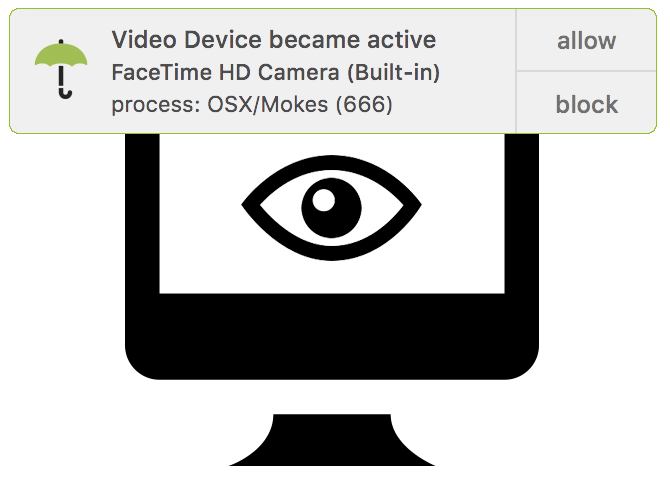
Screenshot 1 of 1
Overview
OverSight is an essential open-source macOS privacy & security utility created by Objective-See. Running quietly in your menu bar, OverSight monitors internal microphones and webcams in real time—identifying the exact background process triggering audio/video activation and raising immediate interactive alerts so unauthorized spyware cannot record silently.
How It Works
OverSight operates through structured, deterministic execution stages:
CoreMediaIO & Audio Device Hooks: Monitors macOS hardware drivers continuously to intercept camera power-on or internal microphone activation signals.
Caller Process Attribution: Inspects Mach task lists and open descriptors to trace the exact PID, signing status, and binary path triggering the sensor.
Real-Time Interactive Desktop Alerts: Pops immediate modal warnings identifying stealth recordings so users can allow FaceTime or block spyware processes.
Persistent Whitelist Profiles: Saves verified conferencing apps cleanly while continuing background vigilance for unexpected silent captures.
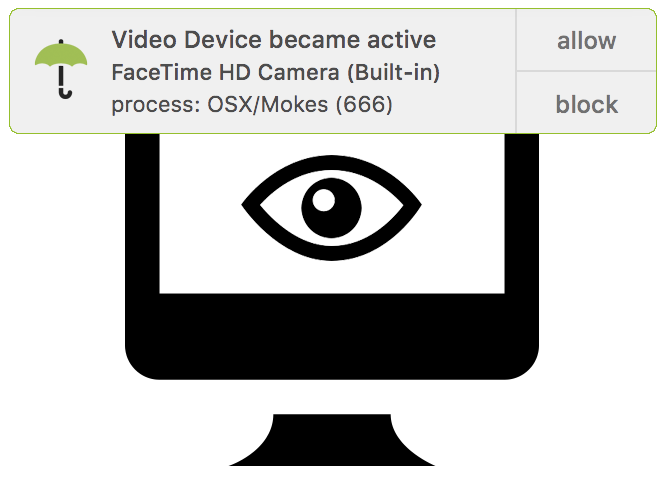
OverSight desktop security alert when webcam or microphone activates
Key Technical Features & Capabilities
Real-Time Sensor Activation Alerts: Intercepts low-level CoreMediaIO camera notifications and CoreAudio microphone power events immediately.
Deep Process Attribution: Traces device handles and Mach metadata to pinpoint which executable and PID activated your mic or webcam.
Persistent Trust Whitelist: Allows verified video conferencing tools (Zoom, FaceTime, Teams, OBS) cleanly while blocking or alerting on unrecognized apps.
Zero-Telemetry Open Security: Audited Objective-C codebase operating completely offline with zero external accounts or data collection.
Architecture & Technology Stack
Primary Languages: Objective-C
System Frameworks: CoreAudio, CoreMediaIO, AVFoundation, AppKit, XPC
Build System: Xcode Workspace (
OverSight.xcworkspace)Supported Platforms: macOS 11+ (Universal Apple Silicon & Intel)
System Requirements
| Specification | Minimum Requirement | Recommended Specification |
|---|---|---|
| Operating System | macOS 11.0+ (Universal Apple Silicon & Intel) | Latest stable release build |
| Processor Architecture | 4-Core x86_64 or Apple Silicon M1 | 8-Core Apple Silicon / Core i7+ |
| Memory (RAM) | 4 GB Unified Memory | 16 GB+ High-Speed RAM |
| Disk Space | 1 GB free SSD storage | 5 GB+ free SSD storage |
Installation & Setup Guide
macOS Installation
1
Download
OverSight_2.4.0.zip directly from CookApps.2
Unpack and run
OverSight Installer.app to register the background monitor cleanly.Building from Source
bash
git clone https://github.com/objective-see/OverSight.git
cd OverSight
open OverSight.xcworkspace
How to Use & Workflow
1
Complete One-Click Install: Launch the installer helper and confirm menu bar integration.
2
Respond to Alerts: Whenever any app switches on the FaceTime camera or microphone, click Allow, Block, or Always Allow.
3
Audit Rules: Manage whitelisted executables or inspect active capture sessions directly from the OverSight menu bar dropdown.
Troubleshooting & Common Issues
Issue: Installer requests reboot or fails to block non-root microphone captures.
*Cause*: macOS audio/video daemons hold cached permissions across sessions or system extensions require user approval.
*Resolution*: Ensure OverSight helper permissions are approved in System Settings › Privacy & Security and grant Full Disk Access if attributing restricted binaries.
How to Use & Getting Started
## Installation & Setup Guide
### macOS Installation
1. Download `OverSight_2.4.0.zip` directly from CookApps.
2. Unpack and run `OverSight Installer.app` to register the background monitor cleanly.
### Building from Source
```bash
git clone https://github.com/objective-see/OverSight.git
cd OverSight
open OverSight.xcworkspace
```
Ready to run OverSight?
100% Free & Open-Source native desktop software. Star the repository to support development.