4.7

Mac Mouse Fix
Mac Mouse Fix - Make Your $10 Mouse Better Than an Apple Trackpad!
SHARE
Screenshots (2)
Screenshot 1 of 2
Overview
Mac Mouse Fix transforms any standard $10 three-button or multi-button mouse into an Apple Trackpad-grade navigation device on macOS. Featuring buttery-smooth inertial scroll momentum, Mission Control / App Exposé gesture emulation, Space switching via button drags, and zero external kernel drivers, it delivers crisp native ergonomics.
How It Works
Mac Mouse Fix operates through structured, deterministic execution stages:
Modern Trackpad Gesture Simulation: Maps third-party multi-button mice and middle-clicks to Mission Control, App Exposé, Look Up, and smooth desktop swiping.
Inertial & Accelerated Smooth Scrolling: Eliminates coarse stepped wheel ticks by synthesizing fluid, pixel-accurate Apple trackpad momentum curves.
Per-Application Remapping Rules: Adapts button modifiers, pinch-zoom triggers, and drag-to-scroll actions dynamically based on the active window.
Zero-Driver Quartz Event Tap: Intercepts HID events securely in userspace through Apple's CoreGraphics Event Services with complete privacy.
Key Technical Features & Capabilities
Smooth Trackpad-Grade Scrolling: Rewrites stepped physical mouse wheel pulses into fluid, variable-momentum pixels mirroring Magic Trackpad inertia.
Gesture Simulation on Standard Mice: Hold and drag side or middle buttons to glide smoothly between Mission Control, App Exposé, and macOS Spaces.
Rich Button & Modifier Remapping: Remaps mouse buttons 3-32 and click-and-drag gestures independently per keyboard modifier (
⌘, ⌥, ⇧, ⌃).Lightweight Helper Architecture: Runs all HID event capture via Apple's Accessibility and CoreGraphics Event Services with ultra-low background CPU usage.
Architecture & Technology Stack
Primary Languages: Objective-C, Swift, Objective-C++
System Frameworks: Cocoa / AppKit, CoreGraphics (Quartz Event Services), IOKit, Sparkle
Build System: Xcode Project (
Mouse Fix.xcodeproj)Supported Platforms: macOS 11 Big Sur or later (Universal Binary)
System Requirements
| Specification | Minimum Requirement | Recommended Specification |
|---|---|---|
| Operating System | macOS 11.0+ (Universal Apple Silicon & Intel) | Latest stable release build |
| Processor Architecture | 4-Core x86_64 or Apple Silicon M1 | 8-Core Apple Silicon / Core i7+ |
| Memory (RAM) | 4 GB Unified Memory | 16 GB+ High-Speed RAM |
| Disk Space | 1 GB free SSD storage | 5 GB+ free SSD storage |
Installation & Setup Guide
macOS Installation
1
Download
MacMouseFixApp.zip from CookApps or install via Homebrew: brew install --cask mac-mouse-fix.2
Drag
Mac Mouse Fix.app into /Applications.3
Enable the background helper inside System Settings › Privacy & Security › Accessibility when prompted.
Building from Source
bash
git clone https://github.com/noah-nuebling/mac-mouse-fix.git
cd mac-mouse-fix
open "Mouse Fix.xcodeproj"
How to Use & Workflow
1
Enable Accessibility Helper: Grant Accessibility access so Mac Mouse Fix can capture button clicks and filter stepped scroll wheels.
2
Tune Smoothness Profile: Select Mac Mouse Fix, High, or Smooth scrolling curves on the Scrolling tab.
3
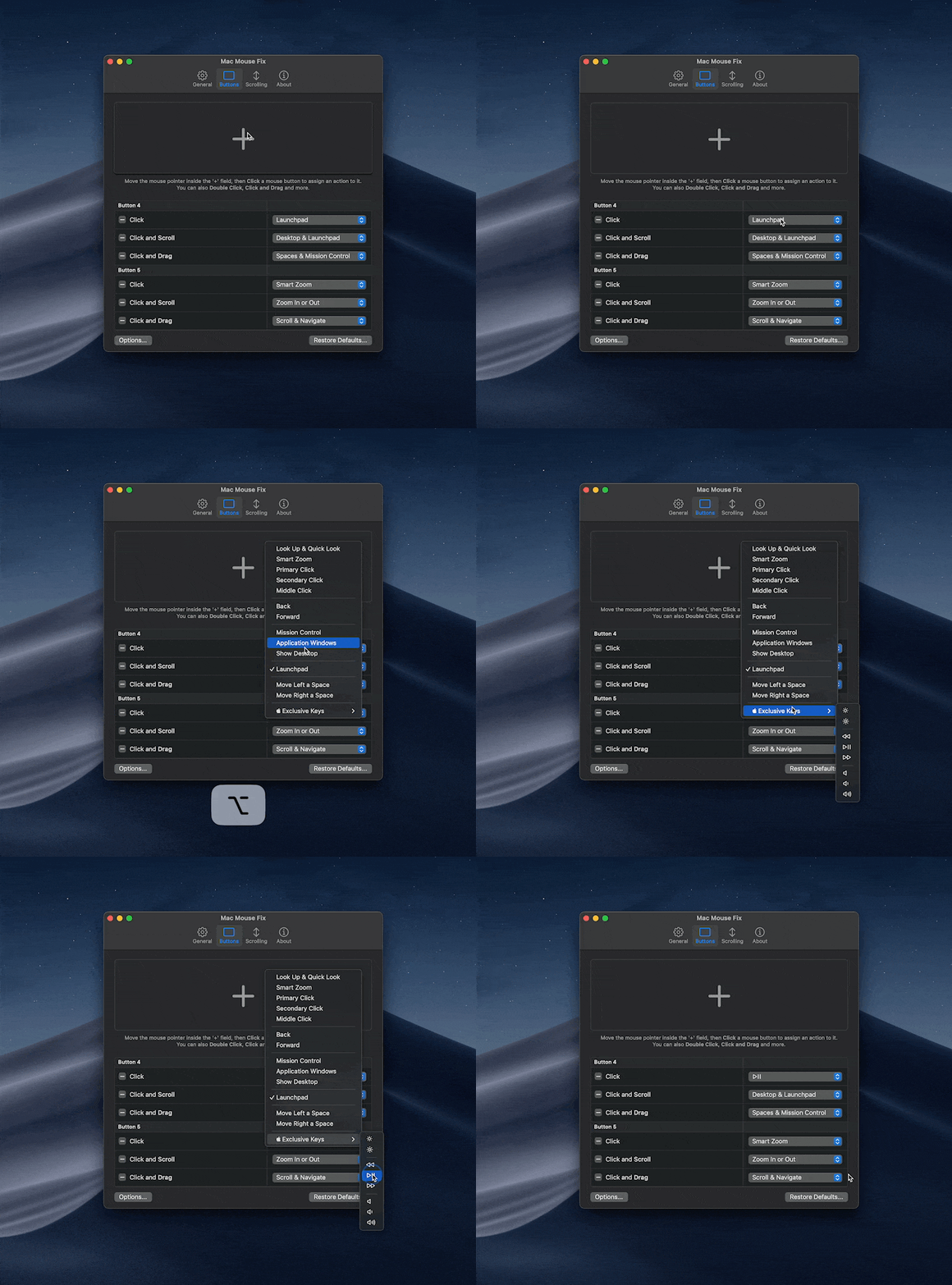
Bind Multi-Button Actions: Click inside the Buttons capture zone to customize single clicks, double clicks, and Click-and-Drag gestures.
4
Enjoy Across All Displays: Scroll spreadsheets, timelines, and desktops smoothly without losing cursor responsiveness.
Troubleshooting & Common Issues
Issue: Scrolling stops responding smoothly after upgrading macOS.
*Cause*: macOS TCC security revoked helper Accessibility privileges following a major OS or app upgrade.
*Resolution*: Toggle off and back on both
Mac Mouse Fix and Mac Mouse Fix Helper in Privacy & Security › Accessibility.How to Use & Getting Started
## Installation & Setup Guide
### macOS Installation
1. Download `MacMouseFixApp.zip` from CookApps or install via Homebrew: `brew install --cask mac-mouse-fix`.
2. Drag `Mac Mouse Fix.app` into `/Applications`.
3. Enable the background helper inside **System Settings › Privacy & Security › Accessibility** when prompted.
### Building from Source
```bash
git clone https://github.com/noah-nuebling/mac-mouse-fix.git
cd mac-mouse-fix
open "Mouse Fix.xcodeproj"
```
Ready to run Mac Mouse Fix?
100% Free & Open-Source native desktop software. Star the repository to support development.