unparalleled-skillset

Agent skills for bespoke websites and app UI: product-derived direction, no generic AI templates, and a Playwright screenshot review loop. Installs into Claude Code, Codex, Cursor, Copilot, Gemini and more via npx.
curl -fsSL https://cookapps.net/api/skills/install?skills=••••••• | node
Unparalleled mark
Unparalleled
Design skills with a point of view.
Build with your agent. Review the work together.



Unparalleled helps coding agents design websites and working interfaces around the actual product. It turns a loose prompt into a high-performance brief, writes the product truth and a standards-based design system (product.md, design.md, design.html), chooses color with the Color Intelligence Layer, then builds and checks the result against that system. You approve the design before development and the working product before delivery.
Unparalleled Studio brings the conversation onto your running page: pick an element, describe a change, let your existing agent edit the source, then keep or undo the result.
Start here
Requires Node.js 20+, npm and a supported coding agent. Run these commands inside your project. Downloads use this GitHub repository.
npx github:Phantom-Con-Artist/unparalleled-skillset setup
npx github:Phantom-Con-Artist/unparalleled-skillset doctor
Start a new agent session after installation. Ask for the applicable skill:
Use unparalleled-website to build our botanical research website. Start with the prompt architect, write product.md and design.md, and show me design.html before you build. Develop progressively with Playwright checks and human review.
For an application, use unparalleled-ui. You can name the skill in plain language or use your agent's skill picker.
Install one skill, choose an agent, or update
# Choose the surface
npx github:Phantom-Con-Artist/unparalleled-skillset install website
npx github:Phantom-Con-Artist/unparalleled-skillset install ui

# Choose integrations or preview the installation
npx github:Phantom-Con-Artist/unparalleled-skillset install all --agent claude,codex
npx github:Phantom-Con-Artist/unparalleled-skillset install all --dry-run

# Install across projects, or refresh an existing installation
npx github:Phantom-Con-Artist/unparalleled-skillset install all --global
npx github:Phantom-Con-Artist/unparalleled-skillset update
The installer copies skills and adds managed routing notes. It preserves unrelated project instructions and backs up overwritten content. It does not change agent credentials, trust or permissions. The optional Claude Code hook changes project settings only when explicitly requested with hook --write.
Installation, options and recovery →
Two skills, one design discipline
| Unparalleled Website | Unparalleled UI | |
|---|---|---|
| Use for | Public websites, portfolios, landing pages and product stories | Applications, dashboards, tables, editors, forms and settings |
| Design around | The offer, a product-specific demonstration and the visitor's journey | The actual task, data relationships, decisions and recovery |
| Production | 2D, 3D or hybrid; illustration, meaningful motion and kinetic text when useful | Product-derived components, readable density, keyboard/touch use and complete states |
| Read the skill | unparalleled-website | unparalleled-ui |
Each skill is independently installable and includes its own references, templates and tools. The agent recommends a stack from the project context; your explicit choices take precedence.
From your prompt to a working experience
flowchart LR
  A[Your prompt] --> B[Prompt architect subagent]
  B --> C[High-performance prompt]
  C --> D[product.md + vocabulary]
  D --> E[design.md]
  E --> F[design.html]
  F --> G{Playwright + your review}
  G -- No: refine --> E
  G -- Yes --> H[Build]
  H --> I{Playwright: matches design.md?}
  I -- No: refine --> H
  I -- Yes --> J[Your review → delivery]
design.md is written in a fixed order, one professional discipline per section: brand personality, color (through the Color Intelligence Layer), typography, spatial and layout, negative space, visual assets (2D image and vector, or 3D through Blender), components, UX and information architecture, responsive, motion, accessibility (WCAG 2.2 AA) and conversion. Each discipline has its own reference with the standards to fetch, allowed practice and banned practice. Negative space governs them all: every element must earn its place.
Two reviews work together at each gate. The inner loop renders, measures and repairs with Playwright: check-design-sync.mjs proves a page implements design.md's tokens, fonts and noise budget, and capture.mjs flags template tells and visual noise. The outer loop brings design.html, and later the working product, to you. A "no" always returns to refinement. Local fixes inherit the approved design.
Shapes are chosen per role. Pills, rounded components, square edges and other forms are available when they fit the product and task. Scores and scripts help compare decisions; accessibility, rendered behavior and your approval remain separate checks.
Color Intelligence Layer
packages/color-intelligence is an offline palette engine with a local MCP server. It turns aesthetic terms into role-based palettes, keeps your brand colors locked, and certifies the declared text and UI pairs against WCAG 2.2 (with APCA as supplementary guidance).
**Status: local alpha (0.2.0a1, Apache-2.0).** Vendored from the Color Engine workspace at commit b453653. It is offline at runtime and needs no API keys or network. The bundled model has 117 aesthetic terms with 185 aliases and a catalog of 238 palettes. Its 37 runtime tests pass, including a real MCP stdio round trip. What it does not do yet: its aesthetic similarity scores are uncalibrated, and no bundled palette has an independent human aesthetic approval. Certificates cover only the declared role pairs, not a whole page.
npm run color:setup    # Python 3.11+: builds packages/color-intelligence/.venv and registers the MCP server in .mcp.json
npm run color:doctor   # model, vocabulary and catalog facts
npm run test:color     # runtime tests
How the skills use it. Color is the first visual step of design.md, right after brand personality (color.md):
vocabulary), and existing brand colors become locked_roles.generate_palette runs with the real body size and weight from typography, at level AA or AAA. The agent reads status, changes, unresolved and the certificate.analyze_palette with every real pairing (status, focus, selection, borders) extends the certificate to the full role set.design.color_intelligence.mode as mcp, cli or fallback, and the design gate refuses a record without the evidence file, or a fallback without a stated reason.check-contrast.mjs checks composited pairs, and check-design-sync.mjs checks that the built page uses the approved color tokens.Both examples carry real engine output in examples/*/color/analyze.json. The agent connects through the MCP server when it's registered, through the CLI on PATH otherwise, and as a last resort uses hand-derived OKLCH with measured pairs.
How to brief, review and resume work →
Unparalleled Studio
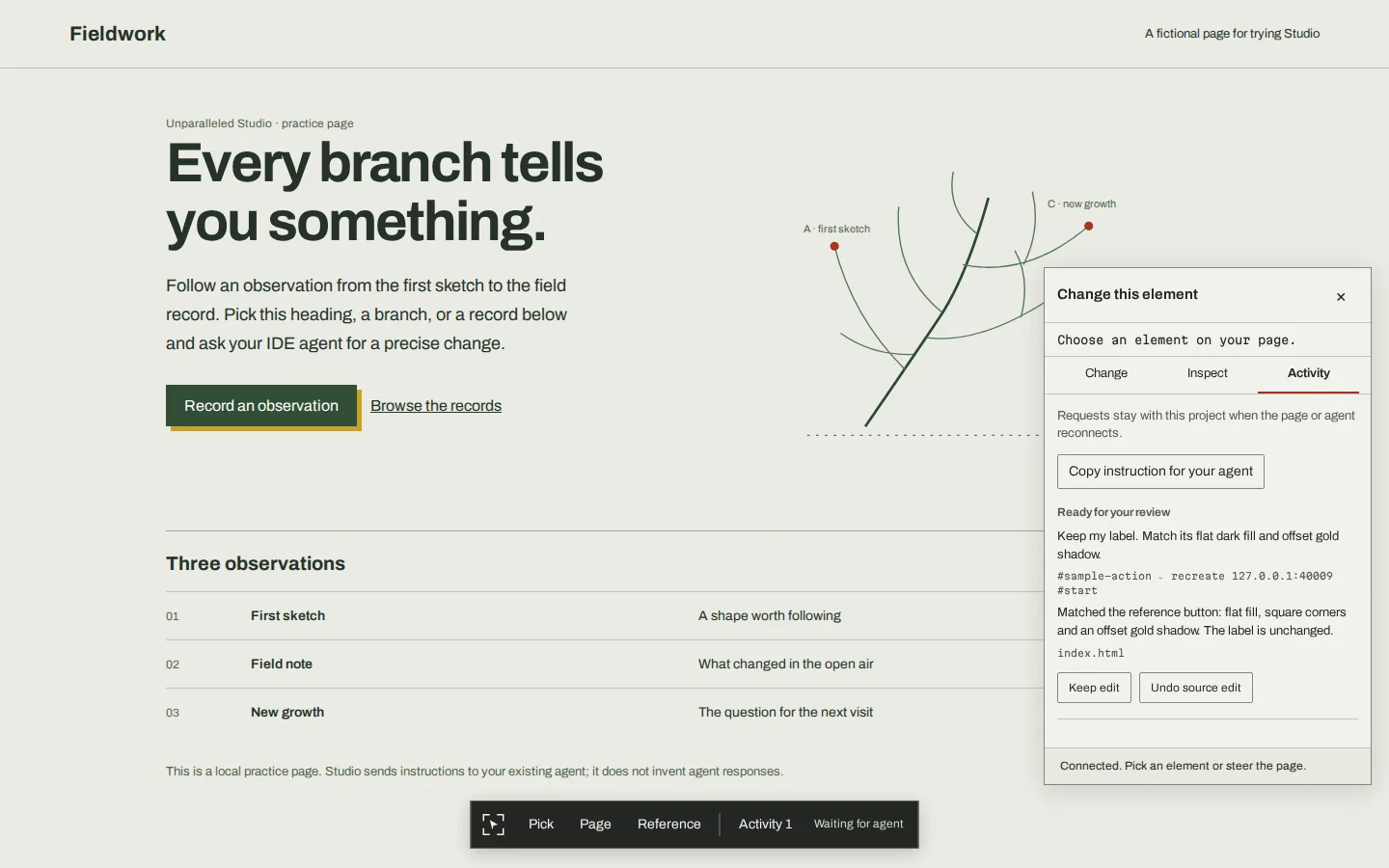
Unparalleled Studio on its fictional Fieldwork practice page, showing a selected change and Keep edit / Undo source edit controls
*Studio's included practice page. The Activity panel shows a source change ready for review.*
# Try the included practice page
npx github:Phantom-Con-Artist/unparalleled-skillset studio --demo --port 4310

# Or attach Studio while serving a static project
npx github:Phantom-Con-Artist/unparalleled-skillset studio --root ./my-site --port 4310
Open the printed URL. Copy the printed instruction to your coding agent, keep it listening, then use Pick for an element or Page for a broader instruction. Review the result in Activity and choose Keep edit or Undo source edit.
Studio includes computed-style inspection, source-location hints, a durable request queue, guarded source edits, multi-file transactions, reference picking and an MCP server. It uses your existing agent; the browser overlay does not run a model or automatically wake an ended conversation.
Use the development-only Vite adapter for Vite projects. Static serving does not compile framework source. The Studio manual covers setup, the agent loop, Vite, MCP, references, patch files and troubleshooting.
Works with your agent
The installer supports Codex, Claude Code, Cursor, GitHub Copilot, Gemini CLI, Antigravity, Windsurf, Devin, OpenCode, Cline, Roo Code and Kiro. Detection finds local executables/configuration; it does not prove an agent is logged in or that every integration offers identical capabilities.
A browser is needed for rendered review. Blender/MCP, image generation and motion renderers are used when the chosen pipeline needs them. They are not silently installed with the skills. If delegation or another capability is unavailable, the agent reports the limit instead of fabricating evidence.
Manuals and references
| Guide | What you will find |
|---|---|
| Unparalleled manual | Installation, useful prompts, brand-kit review, progressive work, local fixes and validation tools |
| Studio manual | Page picking, agent connection, Vite, MCP, source patches, references and recovery |
| Installation reference | Command options, discovery paths, updates, backups and optional prompt hook |
| Design measurements | Color diagnostics, type scales, layout, motion and performance criteria |
| Changelog | What changed in 1.2.0 |
Development
git clone https://github.com/Phantom-Con-Artist/unparalleled-skillset.git
cd unparalleled-skillset
npm install
npm test
npm run validate-all
npm run check-contrast
validate-all checks skill structure and local links. check-contrast without input checks reference fixtures. Neither certifies a generated interface; inspect the render and measure its actual foreground/background pairs.
The repository contains the installer (bin/, lib/), standalone skills (.agents/skills/), Studio packages (packages/), runnable examples (examples/) and the public showcase (site/). Legacy unused layout fragments and retired catalog stubs have been removed; the examples remain illustrative, not universal design presets.
MIT License · Created by Subhradeep Sarkar
More in agent
View all agent skills →Reverse Engineer Anything
One MCP for reverse engineering across binaries, applications, and runtime behavior. Point your AI coding agent at any compiled app to understand its mechanics down to the binary level.
Skills for Real Engineers Matt Pocock AIHero
The definitive suite of 39 production grade agent skills by Matt Pocock for real software engineering, domain modeling, rigorous alignment grilling, TDD, and deep module architecture.