4.8
Vauta
Meeting notes that stay on your Mac: transcribes any call on device and writes cited minutes, decisions and tasks.
SHARE
Screenshots (8)
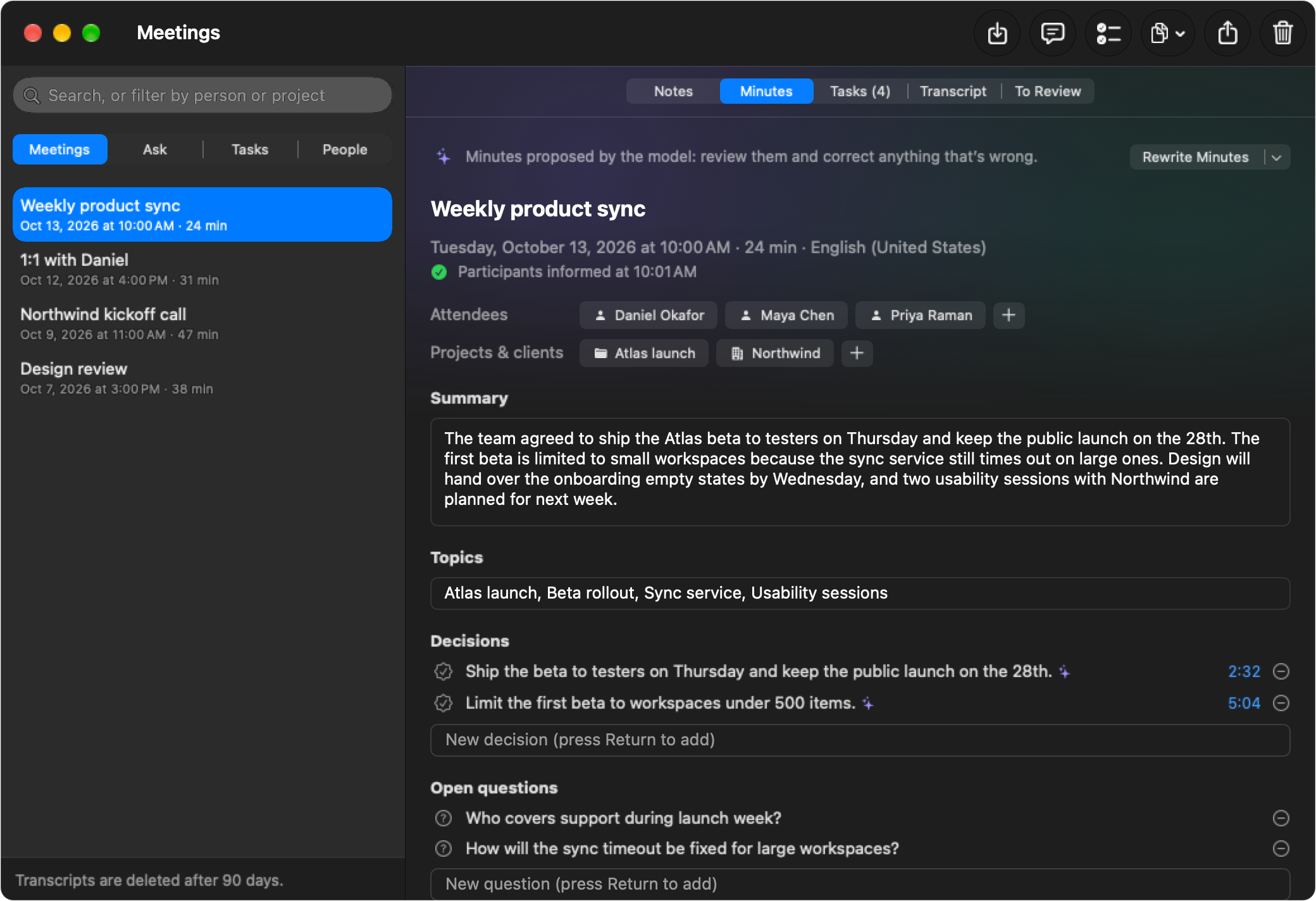
Screenshot 1 of 8
Overview
Vauta is an advanced, high-performance desktop application engineered for seamless native performance, local-first data processing, and refined user experience.
Vauta is built on open-source principles to guarantee security, privacy, and full reproducibility. All sensitive data transformations run locally on your hardware with zero telemetry or unexpected cloud dependencies.
Key Technical Features & Capabilities
No bot joins your call. Vauta records two channels on your Mac: your microphone as Me and the call audio as Others. Nobody else needs to install or accept anything.
**Any meeting app or browser. Capture Safari and other WebKit browsers, Chrome and other Chromium browsers, Firefox and other Gecko browsers, Zoom, Microsoft Teams, Slack, Discord, Webex and FaceTime (which of them are verified in real calls is in Compatibility). *Auto* follows whichever app is using the microphone, and *All system audio* is there for everything else. Vauta can also suggest recording when a meeting app starts using the microphone.**: Streamlined desktop functionality optimized for macOS and Windows.
Any language Apple supports. Transcription uses Apple's on-device speech models. Each meeting keeps its own language, and minutes can be written in the meeting's language or in one you choose.: Streamlined desktop functionality optimized for macOS and Windows.
Live Translation. While you record, a floating captions panel shows what the other participants say, translated into your language by Apple's on-device Translation. If you have a model server, it then re-translates each finished sentence with the previous ones as context and, when it answers within 4 seconds, replaces the caption in place; otherwise Apple's version stays. It stays above full-screen meeting apps, never takes focus, and ⌃⌥T turns it on or off. Finished sentences are kept, encrypted, with the transcript.: Streamlined desktop functionality optimized for macOS and Windows.
A reminder to tell the other participants. When recording starts, the panel offers a short notice to paste into the meeting chat, written in the meeting's language, with a Copy button and "Mark as Informed" (Vauta keeps the date with the meeting; Undo takes it back). It never sends anything and never blocks recording. Choose when it appears in Settings → Recording.: Streamlined desktop functionality optimized for macOS and Windows.
Minutes with templates. Summary, topics, decisions, tasks with owners and dates, and open questions. Templates for a general meeting, one-on-one, stand-up, client or sales call, interview, and class or talk. Live notes, marks and your own short notes while you record: type a bullet (in the panel or in a floating notepad that Vauta asks macOS to keep out of screen sharing, which is not guaranteed) and Vauta writes it out from what was said, every sentence cited to the transcript and verified, with your words always first.
Ask, with citations. Ask questions across all your meetings or a single one. Answers cite the passages they come from, and each citation opens the transcript at that moment. A question that names when its meetings were ("last week", "yesterday's call") looks only in those meetings, and the control under the question turns that off. Keyword search always works. An optional search model, EmbeddingGemma 2 by Google (574 MB, downloaded only when you ask), adds search by meaning on this Mac, in any language and across languages.: Streamlined desktop functionality optimized for macOS and Windows.
Live answers to the questions asked in the meeting. While you record, Vauta notices questions asked aloud, by you or by anyone else, and shows a short answer in the panel when your meeting so far, your past meetings or your documents can answer it, with the line it quotes for each claim. It works with the integrated model or a model server (not with Apple Intelligence: see below), takes no focus, makes no sound, never speaks, searches no web and sends nothing beyond the model you chose. The card shows the claims, each citing a line whose words it quotes, and an answer with a claim that could not be matched to a quote is not shown. A matching quote does not prove the claim is right: the blind judge found few shown answers correct (2% for Apple, 21% for Gemma in English) and most of the rest restating the question or answering something that was not a question, and unsupported claims in 42% (Apple) and 21% (Gemma) of the answers shown (see below). Turn it on, or choose where it looks, in Settings → Recording → Live answers. It starts off and is not offered with Apple Intelligence: it was measured on public meetings and 2% of the answers it showed were judged correct in English (3.63 false answers an hour against a gate of 1), so with Apple's on-device model Settings shows no switch, only a note that live answers need the integrated model or a model server, and a recording never looks for questions, whatever you chose before. The integrated model did not meet the gates either (21% judged correct against 85%, 1.60 false answers an hour) and a model server has not been measured yet (see LANGUAGE_MODEL.md), so with those you turn it on in Settings if you want to try it.
Architecture & Technology Stack
Primary Languages: Swift, Rust
Frameworks & UI Runtime: SwiftUI / AppKit, Tauri 2
Build Systems & Tooling: Cargo
Supported Platforms: macOS 12.0+ (Apple Silicon M1-M4 & Intel x86_64), Windows 10/11 x64, Linux
System Requirements
| Specification | Minimum Requirement | Recommended Specification |
|---|---|---|
| Operating System | macOS 12.0 Monterey / Windows 10 x64 | macOS 14.0+ Sonoma / Windows 11 x64 |
| Processor Architecture | Apple Silicon (M1+) or Intel Core i5 x64 | Apple Silicon Unified Memory (M2/M3/M4) |
| Memory (RAM) | 4 GB Unified RAM | 8 GB+ High-Speed RAM |
| Storage Space | 300 MB available local disk space | 1 GB+ SSD storage |
| GPU Acceleration | Metal 2 / DirectX 12 compatible | Apple Neural Engine / Vulkan capable |
Installation & Setup Guide
macOS Installation (Recommended)
1
Download the verified
.dmg release installer directly from CookApps.2
Open the disk image and drag Vauta.app into your
/Applications folder.3
Launch Vauta via Spotlight (
Cmd + Space) or Launchpad.Alternatively, install using Homebrew if available:
bash
brew install --cask vauta
Windows Installation
1
Download the official installer package (
.exe / .msi).2
Run the executable and follow the setup wizard.
3
Launch Vauta from the Start Menu or desktop shortcut.
Building from Source (Development Setup)
bash
git clone https://github.com/MaquinaTech/Vauta.git
cd Vauta
pnpm install || cargo build --release
pnpm run build
How to Use & Workflow
1
Application Launch & Workspace: Open Vauta to load the responsive native workspace.
2
Configuration & Preferences: Press
Cmd + , (macOS) or Ctrl + , (Windows) to configure hardware acceleration, custom directories, and display themes.3
Primary Operation: Drag-and-drop source files or input parameters directly into the central window.
4
Execution & Export: Initiate the processing pipeline and verify output files saved directly to your chosen local directory.
Troubleshooting & Common Issues
Problem: macOS Gatekeeper displays *"App is damaged and can't be opened"* or unnotarized developer notice.
Root Cause: macOS quarantine flag set on binaries downloaded outside the Mac App Store.
Resolution: Open Terminal and run:
bash
xattr -cr /Applications/Vauta.app
Alternatively, navigate to System Settings > Privacy & Security and select Open Anyway.
Problem: High memory consumption during batch processing operations.
Root Cause: Large media buffers retaining uncompressed state.
Resolution: Adjust batch concurrency in settings or process assets in focused batches.
How to Use & Getting Started
## Installation & Setup Guide
### macOS Installation (Recommended)
1. Download the verified `.dmg` release installer directly from CookApps.
2. Open the disk image and drag **Vauta.app** into your `/Applications` folder.
3. Launch Vauta via Spotlight (`Cmd + Space`) or Launchpad.
Alternatively, install using Homebrew if available:
```bash
brew install --cask vauta
```
### Windows Installation
1. Download the official installer package (`.exe` / `.msi`).
2. Run the executable and follow the setup wizard.
3. Launch **Vauta** from the Start Menu or desktop shortcut.
### Building from Source (Development Setup)
```bash
git clone https://github.com/MaquinaTech/Vauta.git
cd Vauta
pnpm install || cargo build --release
pnpm run build
```
Ready to run Vauta?
100% Free & Open-Source native desktop software. Star the repository to support development.