
MQTTX

An elegant Cross-platform MQTT 5.0 desktop client.
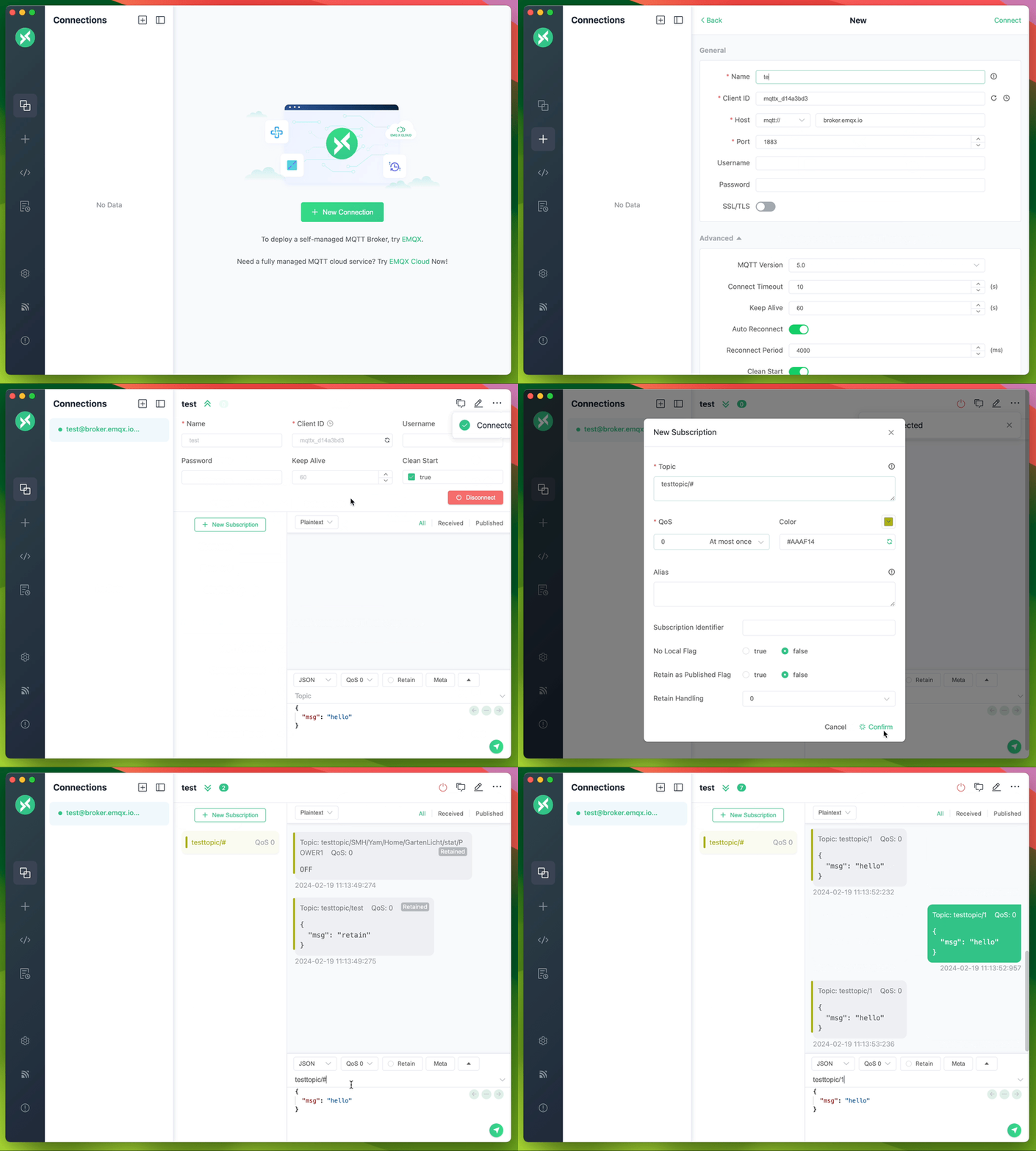
MQTTX
MQTTX is an open-source, cross-platform MQTT 5.0 client toolbox from EMQ for developing, testing, and troubleshooting IoT applications. MQTTX Desktop runs on macOS, Windows, and Linux, with a chat-style interface for multiple connections and subscriptions and a built-in MQTTX Agent to set up connections, exchange messages, and troubleshoot in natural language. MQTTX CLI provides messaging, benchmarks, and data simulation for terminals and automation, while MQTTX Web lets you debug MQTT over WebSocket in the browser without installation.
MQTT (MQ Telemetry Transport) is a lightweight publish/subscribe messaging protocol designed for constrained devices and for low-bandwidth, high-latency, or unreliable networks.
Features
All features
MQTTX Desktop
A graphical client for interactive debugging and message analysis on macOS, Windows, and Linux.
MQTTX CLI
A command-line client for terminal debugging, shell scripts, CI automation, and performance testing.
mqttx conn, mqttx pub, and mqttx sub, with MQTT 3.1, 3.1.1, and 5.0 over TCP, TLS, and WebSocket.mqttx bench, and generate IoT test data with mqttx simulate.MQTTX Web
A browser client for quick tests without installing a desktop app. Open the online client to get started.
ws:// or wss://). HTTPS pages require wss://.Quick Start
MQTTX Desktop
Download the package for your platform from GitHub Releases or the EMQ download site.
On macOS, you can also install MQTTX with Homebrew:
brew install --cask mqttx
+ in the left sidebar, and fill in the required fields.Connect. Use your own broker or the free public MQTT 5.0 broker provided by EMQX Cloud at broker.emqx.io (TCP port 1883, TLS port 8883).MQTTX CLI
Install MQTTX CLI with the install script:
macOS / Linux:
curl -fsSL https://emqx.sh/mqttx | sh
Windows (PowerShell):
irm https://emqx.sh/mqttx.ps1 | iex
Homebrew, npm, Docker and standalone binaries: see the installation docs.
After installation, subscribe in one terminal and publish in another. The subscriber receives the JSON message:
# Terminal 1: subscribe
mqttx sub -h broker.emqx.io -t 'mqttx/quickstart'

# Terminal 2: publish
mqttx pub -h broker.emqx.io -t 'mqttx/quickstart' -m '{"temperature":23.5}'
See the CLI documentation for more commands, benchmarks, and data simulation.
MQTTX Web
Open the online client in your browser and connect to a broker over ws:// or wss://. HTTPS pages require wss://. To host the client yourself, use Docker:
docker run -d --name mqttx-web -p 80:80 emqx/mqttx-web:latest
See the Web README for deployment and usage instructions.
Quick Start
Mở khóa ứng dụng để xem chi tiết hướng dẫn cài đặt, cấu hình môi trường và vận hành.
AI Tools
MQTTX Agent
MQTTX Agent is an AI assistant built into the desktop app. Turn it on in Settings → MQTTX Agent, fill in the API host, key, and model of your provider, then open it full screen from the left bar or as a floating window with Cmd/Ctrl + J.
See MQTTX Agent for setup, Skills, MCP, permissions, and limitations.
MQTTX CLI Skill
Install or update MQTTX CLI
INSTALL.md provides installation and update instructions for agents, including environment detection, package selection, and version verification. Give your agent this prompt:
Read https://raw.githubusercontent.com/emqx/MQTTX/main/INSTALL.md and follow its instructions to install or update MQTTX CLI for this environment. Verify the executable path and version.
The mqttx-cli skill helps agents use MQTTX CLI for connection checks, messaging, MQTT 5 features, TLS/authentication, payload codecs, benchmarks, data simulation, and troubleshooting.
Install it with the Skills CLI:
npx skills add emqx/MQTTX --skill mqttx-cli
To install from a local checkout, run npx skills add . --skill mqttx-cli from the repository root. You can also copy the entire skills/mqttx-cli directory (including references) into your agent's supported skills directory, or ask the agent to read its SKILL.md directly.
Once installed, try a task such as:
Use the mqttx-cli skill to verify a publish/subscribe round trip against my local broker at 127.0.0.1:1883. Use a unique topic under mqttx-test/, finish within 15 seconds, and report the result.
EMQX
MQTTX works with any MQTT broker and pairs especially well with EMQX. Connect to EMQX or EMQX Cloud in a few clicks to debug your applications and explore broker features.
Docs & Community
A blog series on getting started with MQTT in PHP, Node.js, Python, Go, and other languages.
A curated list of popular MQTT client SDKs for many languages, with code examples.
Development
These steps are for the desktop app.
Use the Node.js version in [.nvmrc](./.nvmrc) (currently v22). If you use nvm, run nvm use in the repository root.
git clone git@github.com:emqx/MQTTX.git
cd MQTTX
nvm use
yarn install
yarn run electron:serve
Build installers for Windows, Linux, and macOS:
yarn run electron:build
Installers are written to dist_electron.
Platform builds
# For Windows
yarn run electron:build-win

# For Linux
yarn run electron:build-linux

# For macOS
yarn run electron:build-mac
For CLI and Web development, see the CLI README and Web README. Read the Contributing Guide before opening a pull request.
The desktop app is built with Electron, Vue + Element, TypeScript, TypeORM, SQLite, and MQTT.js.
License
Apache License 2.0, see LICENSE.
How to Use & Getting Started
How to Use & Getting Started
Unlock this app with 1 Redit to access verified runbooks and usage workflows.
Ready to run MQTTX?
100% Free & Open-Source native desktop software. Star the repository to support development.