Hammerdeck
Keyboard window manager for large and multiple displays, with grid placement, moves and swaps between displays, one-key undo, and rules that rearrange w...
Hammerdeck
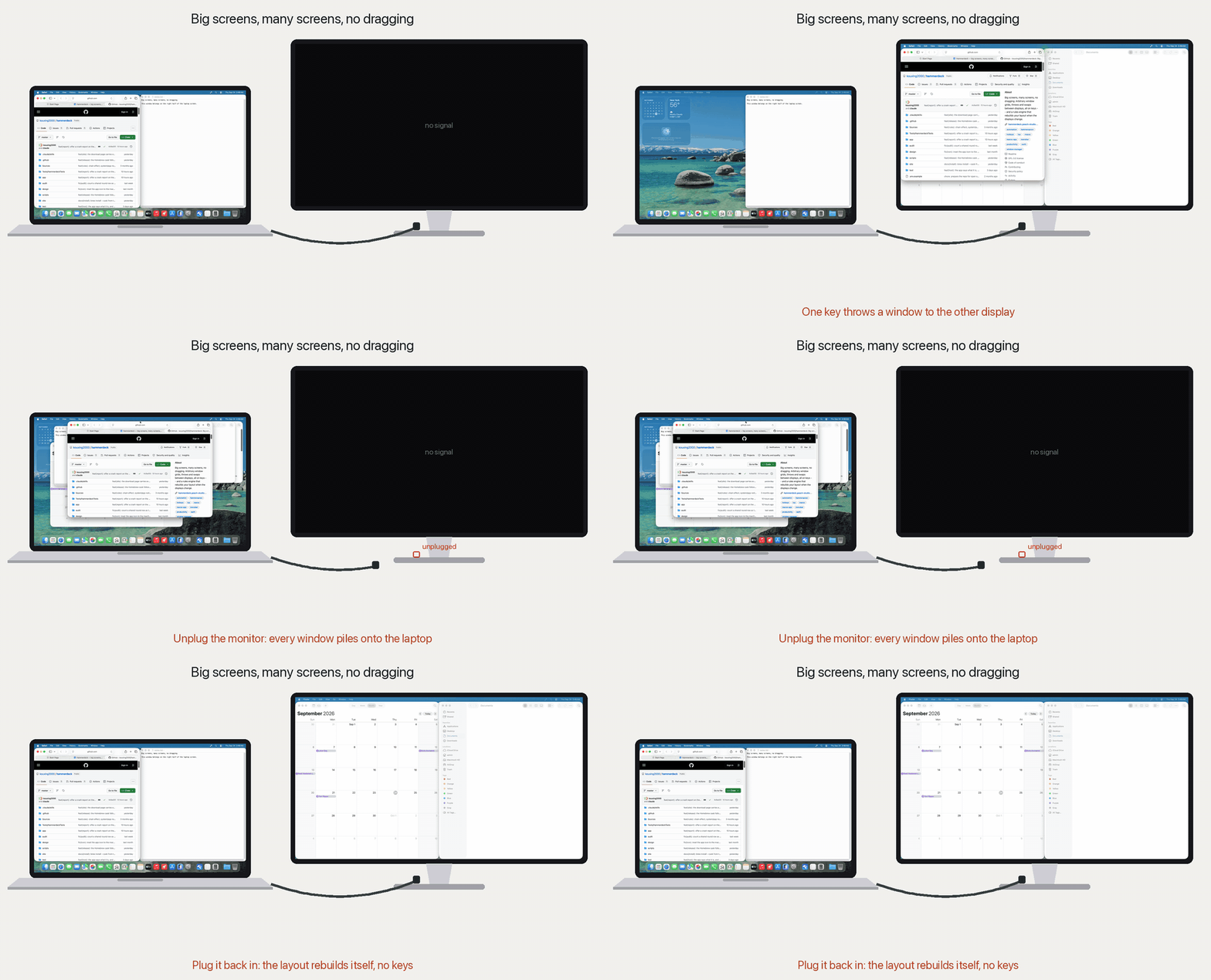
Big screens, many screens, no dragging.
macOS tiles in halves and quarters. That is the right answer on a laptop and the
wrong one on a 49-inch ultrawide -- and across two or three displays there is no
keyboard shortcut at all, at any macOS version, to send a window to the other
display or to swap what sits on each.
Hammerdeck puts all of it on keys: grids (name two cells, the window spans them),
throws and swaps between displays, a deck that keeps every window
reachable, a modal layer for arranging by feel, and one-key undo for any
of it -- each on a hotkey or a chord (cmd+shift+a, then b). Then it does
the same thing without you: a rules engine reacts to the Mac itself, so
connecting a display rearranges your windows instead of you doing it again.
Actions that read your live window stay on keys by design; the ones that need no
context -- refresh the wallpaper, open a set of tabs -- also take **a schedule or
a system event**.
It is a native Swift app with a Lua engine inside -- think a focused, miniature
Hammerspoon -- except you never write Lua. Every feature is a switch, some
options, and a trigger picker. It grew out of the author's own Hammerspoon
config and owes Hammerspoon a great deal (see Third-party).
And it is automation you can see: every shortcut press flashes which action
fired, automated runs can notify you of what happened while you were away, one
hotkey rewinds the last window rearrangement, and every decision lands in a
local, plain-text log. Open source and local-first -- no account, no cloud, no
subscription.
*Every feature is a card. Hover it to see what it does, flip the switch to
turn it on, and the badge shows the shortcut it is bound to.*
See it on an ultrawide
Window Deck -- pick the windows and they tile; focus one and it takes the stage.
Window Grid -- name two corners, the window fills them. One key undoes it.
Window Fan -- every window keeps an edge you can reach.
Window Mode -- halves, corners, centre and size, a key each.
Features
<!-- FEATURES:BEGIN (generated by scripts/gen-readme-features.py -- do not edit by hand) -->
A feature ships off unless its row says *on by default* -- those work from a fresh install. Switch on whatever else you want in Settings and bind it to any trigger.
Windows
Visibility & Trust
Switching & Search
Text
Health
Utilities
Appearance
<!-- FEATURES:END -->
Beyond the catalog, the rules engine wires features together -- built in
Settings, no code. A rule pairs a signal (frontmost app, displays connected,
an app launches or quits, light/dark appearance, power source) with effects:
move windows to a saved
layout, run any feature's action, set the wallpaper, lock the screen, launch or
quit an app, or chain several together. And where the built-in effects end, a
rule can run any macOS Shortcut -- the escape hatch to everything else.
Past the first-party catalog, extensions are your own features: point
Settings > General at a folder and every /lua/init.lua inside it loads
next to the built-ins, with the same manifest contract, the same scoped API,
the same capability gate, and the same quarantine (a broken one shows as a red
row, it never takes the app down). Reload picks up your edits without a
relaunch. [examples/extensions/repo_picker](examples/extensions/repo_picker)
is a complete one to start from -- a searchable list of the Git repositories
under your folders that opens the one you pick in your editor -- and the test
suite loads and drives it, so it cannot quietly fall behind the API.
Writing one need not be a solo job. Switch on agent access in
Settings > General and Hammerdeck serves a local, token-guarded
MCP endpoint on the loopback interface, so a
coding agent can inspect the catalog, see exactly which API a feature is handed,
reload after an edit, read the exact load error, and test-fire what it wrote --
the whole write-and-verify loop against the running app. The same panel copies
or exports the authoring guide as a ready-to-use agent skill, and that guide is
where the tools are listed.
It is off until you turn it on and reachable only from this machine. An agent
working through it can enable a feature in order to test-fire it. What that
feature may reach is not hidden: every one declares its capabilities in
feature.json, the app withholds anything undeclared at run time, and
validate_extension checks the declaration against what the code actually
calls, in both directions. One of the capabilities an extension can declare is
exec -- running another program -- and a program can do whatever you can, so
that declaration is the widest one on the list and says so in as many words.
This is auditability rather than a sandbox, which is a real distinction and not
a hedge: an extension you install is code you chose to run, and the point is
that its reach is written down and machine-checked instead of buried. There is
no tool for running arbitrary Lua -- eval'd code belongs to no feature, so there
is no declaration to check it against and nothing to withhold. os.execute and
io.popen are withdrawn from the embedded interpreter, so the ordinary way to
start a program is the declared, logged one. None of that adds up to
containment: a determined extension can still build code at runtime, and the
honest claim is that an accurate declaration is easy and an inaccurate one is
conspicuous.
Install
**Download the latest release**
-- universal (Apple Silicon and Intel), macOS 13 or later. Every build is
attached to its release here, and
hammerdeck.peach-studio.com points at
the same file if you would rather have a page than a list. It is signed with a Developer ID
and notarized by Apple, so there is no "unidentified developer" wall -- macOS
still asks once whether to open an app downloaded from the internet. Open the
disk image and drag Hammerdeck to Applications; if you run it from somewhere
else it offers to move itself on first launch. That move is not housekeeping:
macOS runs a downloaded app from a randomised read-only path until it has been
moved, and an app running from there can never install its own updates.
Or install it with Homebrew:
brew install --cask kouxing2000/tap/hammerdeck
It keeps itself up to date: Hammerdeck checks for new versions and asks you
before installing any of them -- which is also why brew upgrade leaves it
alone.
Or build it from source (Xcode 16 or later; on macOS 14 also brew install jq):
git clone https://github.com/kouxing2000/hammerdeck.git
cd hammerdeck
scripts/app.sh start
Build through the script rather than a bare swift build: it links with the
linker flags that record the real macOS SDK, and a bare build on Xcode 27 does
not, which changes how AppKit lays some windows out.
A hammer icon appears in the menubar. Click it to fire any enabled feature's
actions; Settings… opens the config window -- toggles, options, and trigger
binding for every feature.
First run starts with the window suite on -- the features marked *(on by
default)* above -- and a short first-run walk that explains the Accessibility ask
before macOS shows it. Everything else stays off until you switch it on.
Bind it to anything
Options and triggers are generated from the feature's own declaration -- there is no
per-feature settings code, and no config file to hand-edit. Any action can be driven by a
hotkey, a chord, a schedule, or a system event.
Permissions
Many features run with no macOS permission at all. The ones that need one:
<!-- PERMISSIONS:BEGIN (generated by scripts/gen-readme-features.py -- do not edit by hand) -->
<!-- PERMISSIONS:END -->
transforms. Everything else in that feature works without one.
Nothing is requested at install. First launch explains why the window features
need Accessibility and offers a button to grant it; most others ask when you
switch them on or first use them, and a feature you never enable never asks.
Full Disk Access is the exception: macOS never asks for it, so you grant it
yourself if you want the Empty the Trash rule. If a
feature does nothing, the pinned
permission gotchas issue
covers the known causes.
Build & test
scripts/app.sh start     # build CLua (vendored Lua 5.4.7) + the host, then launch it
scripts/app.sh stop      # quit it (also: restart, status, logs)
lua test/run.lua         # headless Lua/feature tests (fast inner loop)
scripts/test-lua.sh      # the same suite on the vendored 5.4.7 -- run before committing Lua
scripts/test-swift.sh    # integration tests against the real SwiftLua bridge
scripts/check-lua-types.sh   # LuaLS over the workspace at Error level
swift test is not only for Swift changes: two integration tests read the live
on-disk catalog, so adding or renaming a feature can turn it red.
defaults delete Hammerdeck resets everything to first-run.
Boot without grabbing hotkeys: HAMMERDECK_NO_FIRSTRUN=1 scripts/app.sh start.
Current status and open work live in the
Design
A native Swift host and an embedded Lua engine, meeting at one seam.
The rule that protects every future option: **only the Swift bridge
(app/platform/swift/LuaState.swift, Native.swift and its
Native+.swift extensions) and app/platform/lua/adapter.lua may touch
native/OS APIs.** Everything else reaches
the OS through that seam, so the host stays swappable and a feature never sees the
backend it runs on.
A feature is a folder under app/features//: a feature.json (identity), a
lua/ plugin, and optionally a swift/ for native UI it contributes. It receives
a **scoped ctx** -- every handle it creates is tracked and torn down when it's
disabled. Features are autodiscovered; the Settings form is generated from the
feature's own typed options, so a new plugin gets its UI for free.
[CLAUDE.md](CLAUDE.md) is the full design reference: the layer map, the plugin
contract, and the build/test commands.
Layout
Sources/
  CLua/                    vendored Lua 5.4.7 C source (see Sources/CLua/VENDOR.md)
  HammerdeckNotify/        ObjC shim for permission-free notifications
  Hammerdeck/main.swift    thin launcher -> hammerdeckMain()
app/                       co-located payload: Lua platform + host Swift + features
  hammerdeck.lua           entry point: autodiscovers features, binds enabled ones
  loader.lua               package.searcher: stable require names -> lua/ subfolders
  platform/
    lua/                   THE LUA PLATFORM
      adapter.lua          THE SEAM (Lua side) -- the only Lua file touching the host
      ctx.lua              the scoped, curated API a feature receives
      manifest.lua         manifest schema + validation
      triggers.lua         hotkey | chord | schedule | event -- any trigger, any action
      registry.lua         enabled features; lifecycle + scoped teardown
      rules / signals / effects       the automation engine
    swift/                 THE SWIFT HOST
      LuaState.swift       the SwiftLua bridge -- the seam (Swift side)
      Native.swift (+ Native+.swift)   the native.* table -- OS surface grows here
      StatusBar / SettingsView / *Panel.swift  menubar + config UI + panels
  features//           feature.json (identity) + lua/ (plugin) + swift/ (optional UI)
test/
  harness.lua              discovery + per-case isolation
  fake_adapter.lua         in-memory adapter (controllable clock)
  cases/                   one hermetic case file per feature
  run.lua                  the runner
Contributing
Bug reports and fixes are very welcome; the feature catalog is curated and
first-party, so please open an issue before building a new one. See
[CONTRIBUTING.md](CONTRIBUTING.md).
License
Copyright (C) 2026 kouxing2000.
Hammerdeck is free software under the GNU General Public License v3.0 -- see
[LICENSE](LICENSE). You may use, study, modify, and redistribute it, but any
distributed derivative must also be released under the GPL, with its source.
Hammerdeck, and anything built from it, stays open.
Third-party
Sources/CLua/) -- vendored verbatim under its own MITlicense (Copyright (C) 1994-2024 Lua.org, PUC-Rio); see
[Sources/CLua/VENDOR.md](Sources/CLua/VENDOR.md). The GPL covers Hammerdeck's
own code; the vendored Lua keeps its MIT terms.
Sparkle.framework, embedded in the released app) -- the updateframework, under its own MIT license: Copyright (c) 2006-2013 Andy
Matuschak; 2009-2013 Elgato Systems GmbH; 2011-2014 Kornel Lesinski;
2015-2017 Mayur Pawashe; 2014 C.W. Betts; 2014 Petroules Corporation; 2014 Big
Nerd Ranch. Sparkle's LICENSE also carries the licenses of the components it
bundles in turn.
It began as the author's Hammerspoon config, years of Lua scripts written
against it, and Hammerspoon's design still shows throughout. The grid math in
app/platform/lua/windows.lua is ported from hs.grid, under Hammerspoon's
MIT license (Copyright (c) 2014-2025 Hammerspoon contributors); see
[licenses/Hammerspoon-LICENSE.txt](licenses/Hammerspoon-LICENSE.txt).
makes a window key in app/platform/swift/Native+Activation.swift is ported
from yabai, under its MIT license (Copyright (c) 2019 Åsmund Vikane); see
[licenses/yabai-LICENSE.txt](licenses/yabai-LICENSE.txt).
Every one of these notices ships inside the app, in
Hammerdeck.app/Contents/Resources/Licenses/, alongside a copy of the GPL.
How to Use & Getting Started
Ready to run Hammerdeck?
100% Free & Open-Source native desktop software. Star the repository to support development.
More in system-utilities
View all system-utilities apps →
Plonk
Ten menu bar utilities in one app: a window manager with snap zones you draw yourself, workspaces that reopen your apps on the right monitor, on-device ...

Kawa
Better input source switcher for macOS.

WhatCable
Tells you, in plain English, what each USB-C cable plugged into your Mac can do - speed, power, and e-marker info - from the menu bar.