
Dorothy

Desktop app to orchestrate multiple AI CLI agents simultaneously with automations, Kanban management, and remote control via Telegram.
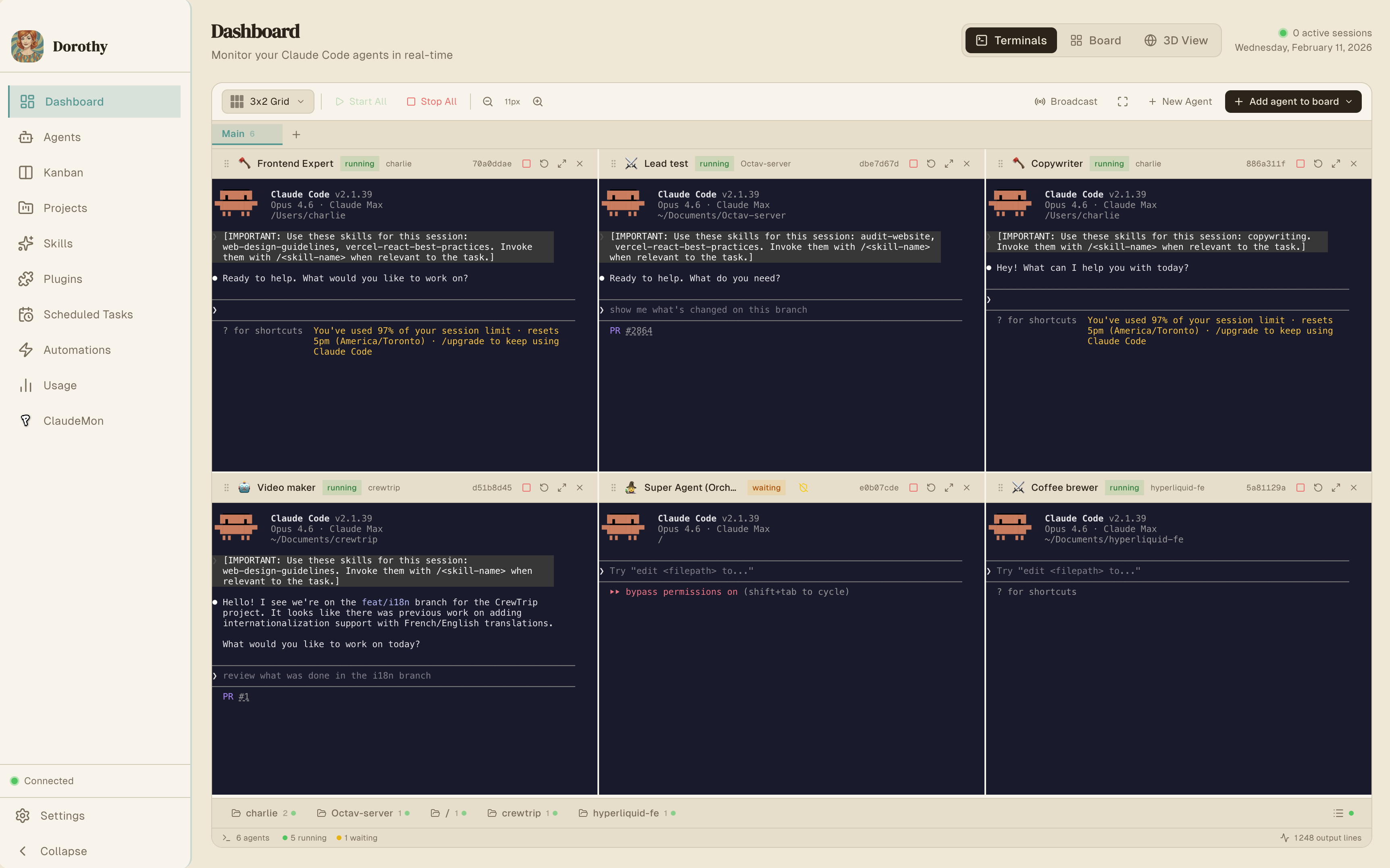
Dorothy
A beautiful desktop app to orchestrate your Claude Code ,Codex, Gemini, Grok and local agents. Deploy, monitor, and debug — all from one delightful interface. Free and open source.
Table of Contents
Why Dorothy
AI CLI tools are powerful — but it runs one agent at a time, in one terminal. Dorothy removes that limitation:
Core Features
Parallel Agent Management
Run multiple agents simultaneously, each in its own isolated PTY terminal session. Agents operate independently across different projects, codebases, and tasks.
Capabilities:
idle → running → completed / error / waiting--add-dir for multi-repo context--dangerously-skip-permissions) for unattended operationSuper Agent (Orchestrator)
A meta-agent that programmatically controls all other agents. Give it a high-level task and it delegates, monitors, and coordinates the work across your agent pool.
Usage Tracking
Monitor Claude Code API usage across all agents — token consumption, conversation history, cost tracking, and activity patterns.
Skills & Plugin System
Extend agent capabilities with skills from skills.sh and the built-in plugin marketplace.
Settings Management
Configure Claude Code settings directly — permissions, environment variables, hooks, and model defaults.
Automations
Automations poll external sources, detect new or updated items, and spawn Claude agents to process each item autonomously. This enables fully automated CI/CD-like workflows powered by AI.
Supported Sources
| Source | Status | Polling Method |
|---|---|---|
| GitHub | Active | gh CLI — pull requests, issues, releases |
| JIRA | Active | REST API v3 — issues, bugs, stories, tasks |
| Pipedrive | Planned | — |
| Planned | — | |
| RSS | Planned | — |
| Custom | Planned | Webhook support |
Execution Pipeline
gh CLI)Template Variables
Use these in your agentPrompt and outputTemplate:
#### GitHub Variables
| Variable | Description |
|---|---|
{{title}} | Item title (PR title, issue title, etc.) |
{{url}} | Item URL |
{{author}} | Item author |
{{body}} | Item body/description |
{{labels}} | Item labels |
{{repo}} | Repository name |
{{number}} | Item number (PR #, issue #) |
{{type}} | Item type (pull_request, issue, etc.) |
#### JIRA Variables
| Variable | Description |
|---|---|
{{key}} | Issue key (e.g., PROJ-123) |
{{summary}} | Issue summary |
{{status}} | Current issue status |
{{issueType}} | Issue type (Task, Bug, Story, etc.) |
{{priority}} | Issue priority |
{{assignee}} | Assigned user |
{{reporter}} | Reporter name |
{{url}} | Issue URL |
{{body}} | Issue description |
Example: Automated PR Review Bot
create_automation({
  name: "PR Code Reviewer",
  sourceType: "github",
  sourceConfig: '{"repos": ["myorg/myrepo"], "pollFor": ["pull_requests"]}',
  scheduleMinutes: 15,
  agentEnabled: true,
  agentPrompt: "Review this PR for code quality, security issues, and performance. PR: {{title}} ({{url}}). Description: {{body}}",
  agentProjectPath: "/path/to/myrepo",
  outputGitHubComment: true,
  outputSlack: true
})
Example: JIRA Issue Processor
create_automation({
  name: "JIRA Task Agent",
  sourceType: "jira",
  sourceConfig: '{"projectKeys": ["PROJ"], "jql": "status = Open"}',
  scheduleMinutes: 5,
  agentEnabled: true,
  agentPrompt: "Work on JIRA issue {{key}}: {{summary}}. Description: {{body}}. Priority: {{priority}}.",
  agentProjectPath: "/path/to/project",
  outputJiraComment: true,
  outputJiraTransition: true,
  outputTelegram: true
})
JIRA automations also create Kanban tasks automatically in the backlog, allowing agents to pick them up via the auto-assignment system.
Kanban Task Management
A task board integrated with the agent system. Tasks flow through columns and can be automatically assigned to agents based on skill matching.
Workflow
Backlog → Planned → Ongoing → Done
Automatic Agent Assignment
The kanban-automation service continuously watches for new tasks and:
ongoingdone when the agent completesThis enables a self-managing task pipeline — add tasks to the backlog and agents automatically pick them up.
Scheduled Tasks
Run Claude Code autonomously on a cron schedule. Useful for recurring maintenance, reporting, monitoring, or any periodic task.
Cron Format
┌───────────── minute (0-59)
│ ┌───────────── hour (0-23)
│ │ ┌───────────── day of month (1-31)
│ │ │ ┌───────────── month (1-12)
│ │ │ │ ┌───────────── day of week (0-7, 0 and 7 = Sunday)
│ │ │ │ │
* * * * *
| Expression | Schedule |
|---|---|
0 9 * * * | Daily at 9:00 AM |
0 9 * * 1-5 | Weekdays at 9:00 AM |
*/15 * * * * | Every 15 minutes |
0 */2 * * * | Every 2 hours |
30 14 * * 1 | Mondays at 2:30 PM |
Platform Support
launchd (launchctl) for reliable background executioncron (crontab)Storage
~/.claude/schedules.json~/.dorothy/scripts/~/.claude/logs/Remote Control
Telegram Integration
Control your entire agent fleet from Telegram. Start agents, check status, delegate tasks to the Super Agent — all from your phone.
| Command | Description |
|---|---|
/status | Overview of all agents and their states |
/agents | Detailed agent list with current tasks |
/projects | List all projects with their agents |
/start_agent | Spawn and start an agent with a task |
/stop_agent | Stop a running agent |
/ask | Delegate a task to the Super Agent |
/usage | API usage and cost statistics |
/help | Command reference |
Send any message without a command to talk directly to the Super Agent.
Media support via the mcp-telegram server: send photos, videos, and documents.
Setup:
/start to your bot to register your chat ID/startSlack Integration
Same capabilities as Telegram, accessible via @mentions or direct messages.
| Command | Description |
|---|---|
status | Overview of all agents |
agents | Detailed agent list |
projects | List projects with agents |
start | Spawn and start an agent |
stop | Stop a running agent |
usage | API usage and cost statistics |
help | Command reference |
Features: @mentions in channels, DMs, Socket Mode (no public URL), thread-aware responses.
Setup:
connections:write (xapp-...)app_mentions:read, chat:write, im:history, im:read, im:writexoxb-...)app_mention, message.imVault
A persistent document storage system that agents can read, write, and search across sessions. Use it as a shared knowledge base — agents store reports, analyses, research findings, and structured notes that any other agent can access later.
Features
MCP Tools
| Tool | Parameters | Description |
|---|---|---|
vault_create_document | title, content, folder, tags? | Create a document (auto-creates folder if needed) |
vault_update_document | document_id, title?, content?, tags?, folder_id? | Update an existing document |
vault_get_document | document_id | Read a document with full content and metadata |
vault_list_documents | folder_id?, tags? | List documents, optionally filtered by folder or tags |
vault_delete_document | document_id | Delete a document |
vault_attach_file | document_id, file_path | Attach a file to a document |
vault_search | query, limit? | Full-text search (supports AND, OR, NOT, phrase matching) |
vault_create_folder | name, parent_id? | Create a folder (supports nesting) |
vault_list_folders | — | List all folders as a tree |
vault_delete_folder | folder_id, recursive? | Delete a folder (optionally with all contents) |
SocialData (Twitter/X)
Search tweets, get user profiles, and retrieve engagement data via the SocialData API. Useful for social media research, monitoring, and analysis tasks.
Setup
MCP Tools
| Tool | Parameters | Description |
|---|---|---|
twitter_search | query, type?, cursor? | Search tweets with advanced operators (from:, min_faves:, filter:images, etc.) |
twitter_get_tweet | tweet_id | Get full tweet details with engagement metrics |
twitter_get_tweet_comments | tweet_id, cursor? | Get replies/comments on a tweet |
twitter_get_user | username | Get a user's profile (bio, followers, stats) |
twitter_get_user_tweets | user_id, include_replies?, cursor? | Get recent tweets from a user |
All tools support cursor-based pagination for large result sets.
Google Workspace
Access Gmail, Drive, Sheets, Docs, Calendar, and more directly from your agents via the Google Workspace CLI (gws). Dorothy integrates gws as an MCP server so agents can read emails, manage files, create documents, and interact with Google APIs.
Setup
brew install google-cloud-sdk)npm install -g @googleworkspace/cliFeatures
gws mcp over stdio, exposing Google APIs as tools (10-80 tools per service)gws-* skills (e.g., gws-gmail, gws-drive, gws-calendar)gws auth login to add or change OAuth scopes without re-running setupDefault Services
| Service | Scope | Description |
|---|---|---|
| Gmail | Read/Write | Send, read, and manage email |
| Drive | Read/Write | Manage files, folders, and shared drives |
| Sheets | Read/Write | Read and write spreadsheets |
| Calendar | Read/Write | Manage calendars and events |
| Docs | Read/Write | Read and write documents |
Additional services (Slides, Tasks, Chat, People, Forms, Keep) are available based on OAuth scopes.
MCP Servers & Tools
Dorothy exposes five MCP (Model Context Protocol) servers with 40+ tools for programmatic agent control. These are used internally by the Super Agent and can be registered in any Claude Code session via ~/.claude/settings.json.
mcp-orchestrator
The main orchestration server — agent management, messaging, scheduling, and automations.
#### Agent Management Tools
| Tool | Parameters | Description |
|---|---|---|
list_agents | — | List all agents with status, ID, name, project, and current task |
get_agent | id | Get detailed info about a specific agent including output history |
get_agent_output | id, lines? (default: 100) | Read an agent's recent terminal output |
create_agent | projectPath, name?, skills?, character?, skipPermissions? (default: true), secondaryProjectPath? | Create a new agent in idle state |
start_agent | id, prompt, model? | Start an agent with a task (or send message if already running) |
send_message | id, message | Send input to a running agent (auto-starts idle agents) |
stop_agent | id | Terminate a running agent (returns to idle) |
remove_agent | id | Permanently delete an agent |
wait_for_agent | id, timeoutSeconds? (300), pollIntervalSeconds? (5) | Poll agent until completion, error, or waiting state |
#### Messaging Tools
| Tool | Parameters | Description |
|---|---|---|
send_telegram | message | Send a text message to Telegram (truncates at 4096 chars) |
send_slack | message | Send a text message to Slack (truncates at 4000 chars) |
#### Scheduler Tools
| Tool | Parameters | Description |
|---|---|---|
list_scheduled_tasks | — | List all recurring tasks with schedule and next run time |
create_scheduled_task | prompt, schedule (cron), projectPath, autonomous? (true) | Create a recurring task |
delete_scheduled_task | taskId | Remove a scheduled task |
run_scheduled_task | taskId | Execute a task immediately |
get_scheduled_task_logs | taskId, lines? (50) | Get execution logs |
#### Automation Tools
| Tool | Parameters | Description |
|---|---|---|
list_automations | — | List all automations with status, source, schedule |
get_automation | id | Get details including recent runs |
create_automation | name, sourceType, sourceConfig, + options | Create a new automation |
update_automation | id, + optional fields | Update configuration |
delete_automation | id | Remove an automation |
run_automation | id | Trigger immediately |
pause_automation | id | Pause scheduled execution |
resume_automation | id | Resume a paused automation |
run_due_automations | — | Check and run all due automations |
get_automation_logs | id, limit? (10) | Get execution history |
update_jira_issue | issueKey, transitionName?, comment? | Update JIRA issue status and/or add a comment |
##### Automation Create Options
| Parameter | Type | Description |
|---|---|---|
sourceType | enum | github, jira, pipedrive, twitter, rss, custom |
sourceConfig | JSON string | Source config (e.g., {"repos": ["owner/repo"], "pollFor": ["pull_requests"]}) |
scheduleMinutes | number | Poll interval in minutes (default: 30) |
scheduleCron | string | Cron expression (alternative to interval) |
eventTypes | string[] | Filter by event type (e.g., ["pr", "issue"]) |
onNewItem | boolean | Trigger on new items (default: true) |
onUpdatedItem | boolean | Trigger on updated items |
agentEnabled | boolean | Enable agent processing (default: true) |
agentPrompt | string | Prompt template with {{variables}} |
agentProjectPath | string | Project path for the agent |
agentModel | enum | sonnet, opus, or haiku |
outputTelegram | boolean | Post output to Telegram |
outputSlack | boolean | Post output to Slack |
outputGitHubComment | boolean | Post output as GitHub comment |
outputJiraComment | boolean | Post a comment on the JIRA issue |
outputJiraTransition | boolean | Transition the JIRA issue status |
outputTemplate | string | Custom output message template |
mcp-telegram
Standalone MCP server for Telegram messaging with media support.
| Tool | Parameters | Description |
|---|---|---|
send_telegram | message, chat_id? | Send a text message |
send_telegram_photo | photo_path, chat_id?, caption? | Send a photo/image |
send_telegram_video | video_path, chat_id?, caption? | Send a video |
send_telegram_document | document_path, chat_id?, caption? | Send a document/file |
Direct HTTPS API calls. File uploads via multipart form data. Markdown formatting support.
mcp-kanban
MCP server for programmatic Kanban task management.
| Tool | Parameters | Description |
|---|---|---|
list_tasks | column?, assigned_to_me? | List tasks, filter by column or assignment |
get_task | task_id (prefix matching) | Get full task details |
create_task | title, description, project_path?, priority?, labels? | Create a task in backlog |
move_task | task_id, column | Move task between columns |
update_task_progress | task_id, progress (0-100) | Update progress |
mark_task_done | task_id, summary | Complete a task with summary |
assign_task | task_id, agent_id? | Assign task to an agent |
delete_task | task_id | Remove a task |
Columns: backlog → planned → ongoing → done
mcp-vault
MCP server for persistent document management. See Vault for full tool reference.
mcp-socialdata
MCP server for Twitter/X data via the SocialData API. See SocialData (Twitter/X) for full tool reference.
Installation
Prerequisites
npm install -g @anthropic-ai/claude-codegh) — required for GitHub automationsDownload
Download the latest release from GitHub Releases.
macOS: If "app is damaged", run xattr -cr /Applications/Dorothy.appBuild from Source
git clone https://github.com/Charlie85270/Dorothy.git
cd Dorothy/app/dorothy
npm install
npx @electron/rebuild        # Rebuild native modules for Electron
npm run electron:dev          # Development mode
npm run electron:build        # Production build (DMG)
Output in release/:
release/mac-arm64/Dorothy.app (Apple Silicon) or release/mac/Dorothy.app (Intel)Web Browser (Development)
npm install
npm run dev
Open http://localhost:3000. Agent management and terminal features require the Electron app.
Installation
Mở khóa ứng dụng để xem chi tiết hướng dẫn cài đặt, cấu hình môi trường và vận hành.
Architecture
System Overview
┌──────────────────────────────────────────────────────────┐
│                     Electron App                          │
│                                                           │
│  ┌───────────────────┐  ┌──────────────────────────────┐ │
│  │  React / Next.js   │  │   Electron Main Process      │ │
│  │  (Renderer)        │←→│                               │ │
│  │                    │  │  ┌──────────────────────────┐ │ │
│  │  - Agent Dashboard │  │  │  Agent Manager           │ │ │
│  │  - Kanban Board    │  │  │  (node-pty, N parallel)  │ │ │
│  │  - Automations     │  │  ├──────────────────────────┤ │ │
│  │  - Scheduled Tasks │  │  │  PTY Manager             │ │ │
│  │  - Usage Stats     │  │  │  (terminal multiplexing) │ │ │
│  │  - Skills/Plugins  │  │  ├──────────────────────────┤ │ │
│  │  - Settings        │  │  │  Services:               │ │ │
│  │                    │  │  │  - Telegram Bot           │ │ │
│  └───────────────────┘  │  │  - Slack Bot              │ │ │
│          ↕ IPC           │  │  - Kanban Automation      │ │ │
│  ┌───────────────────┐  │  │  - MCP Server Launcher    │ │ │
│  │  API Routes        │  │  │  - API Server             │ │ │
│  │  (Next.js)         │←→│  └──────────────────────────┘ │ │
│  └───────────────────┘  └──────────────────────────────┘ │
└──────────────────────────────────────────────────────────┘
           ↕ stdio                     ↕ stdio
┌──────────────────┐ ┌──────────────┐ ┌──────────────┐
│ mcp-orchestrator │ │ mcp-telegram │ │  mcp-kanban  │
│   (26+ tools)    │ │  (4 tools)   │ │  (8 tools)   │
└──────────────────┘ └──────────────┘ └──────────────┘
┌──────────────────┐ ┌──────────────┐
│    mcp-vault     │ │mcp-socialdata│
│   (10 tools)     │ │  (5 tools)   │
└──────────────────┘ └──────────────┘
Data Flow: Parallel Agent Execution
claude CLI process via node-pty (one per agent)~/.dorothy/agents.jsonData Flow: Automation Pipeline
gh CLI, JIRA via REST API)MCP Communication
All MCP servers communicate via stdio (standard input/output):
Claude Code ←→ stdio ←→ MCP Server
                         ├── Tool handlers (Zod-validated schemas)
                         └── @modelcontextprotocol/sdk
Project Structure
dorothy/
├── src/                           # Next.js frontend (React)
│   ├── app/                       # Page routes
│   │   ├── agents/                # Agent management UI
│   │   ├── kanban/                # Kanban board UI
│   │   ├── automations/           # Automation management UI
│   │   ├── recurring-tasks/       # Scheduled tasks UI
│   │   ├── settings/              # Settings page
│   │   ├── skills/                # Skills management
│   │   ├── usage/                 # Usage statistics
│   │   ├── projects/              # Projects overview
│   │   ├── plugins/               # Plugin marketplace
│   │   └── api/                   # Backend API routes
│   ├── components/                # React components
│   ├── hooks/                     # Custom React hooks
│   ├── lib/                       # Utility functions
│   ├── store/                     # Zustand state management
│   └── types/                     # TypeScript type definitions
├── electron/                      # Electron main process
│   ├── main.ts                    # Entry point
│   ├── preload.ts                 # Preload script
│   ├── core/
│   │   ├── agent-manager.ts       # Agent lifecycle & parallel execution
│   │   ├── pty-manager.ts         # Terminal session multiplexing
│   │   └── window-manager.ts      # Window management
│   ├── services/
│   │   ├── telegram-bot.ts        # Telegram bot integration
│   │   ├── slack-bot.ts           # Slack bot integration
│   │   ├── api-server.ts          # HTTP API server
│   │   ├── mcp-orchestrator.ts    # MCP server launcher
│   │   ├── claude-service.ts      # Claude Code CLI integration
│   │   ├── hooks-manager.ts       # Git hooks management
│   │   └── kanban-automation.ts   # Task → Agent auto-assignment
│   ├── handlers/                  # IPC handlers
│   │   ├── ipc-handlers.ts       # Agent, skill, plugin IPC
│   │   └── gws-handlers.ts       # Google Workspace integration
├── mcp-orchestrator/              # MCP server (orchestration)
│   └── src/tools/
│       ├── agents.ts              # Agent management tools (9)
│       ├── messaging.ts           # Telegram/Slack tools (2)
│       ├── scheduler.ts           # Scheduled task tools (5)
│       └── automations.ts         # Automation tools (10+)
├── mcp-telegram/                  # MCP server (Telegram media)
│   └── src/index.ts               # Text, photo, video, document (4)
├── mcp-kanban/                    # MCP server (task management)
│   └── src/index.ts               # Kanban CRUD tools (8)
├── mcp-vault/                     # MCP server (document management)
│   └── src/index.ts               # Vault CRUD + search tools (10)
├── mcp-socialdata/                # MCP server (Twitter/X data)
│   └── src/index.ts               # Twitter search + user tools (5)
└── landing/                       # Marketing landing page
Tech Stack
| Category | Technology | Version |
|---|---|---|
| Framework | Next.js (App Router) | 16 |
| Frontend | React | 19 |
| Desktop | Electron | 33 |
| Styling | Tailwind CSS | 4 |
| State | Zustand | 5 |
| Animations | Framer Motion | 12 |
| Terminal | xterm.js + node-pty | 5 / 1.1 |
| Database | better-sqlite3 | 11 |
| MCP | @modelcontextprotocol/sdk | 1.0 |
| Telegram | node-telegram-bot-api | 0.67 |
| Slack | @slack/bolt | 4.0 |
| Validation | Zod | 3.22 |
| Language | TypeScript | 5 |
Configuration & Storage
Configuration Files
| File | Description |
|---|---|
~/.dorothy/app-settings.json | App settings (Telegram token, Slack tokens, preferences) |
~/.dorothy/cli-paths.json | CLI tool paths for automations |
~/.claude/settings.json | Claude Code user settings |
Data Files
| File | Description |
|---|---|
~/.dorothy/agents.json | Persisted agent state (all agents, all sessions) |
~/.dorothy/kanban-tasks.json | Kanban board tasks |
~/.dorothy/automations.json | Automation definitions and state |
~/.dorothy/processed-items.json | Automation deduplication tracking |
~/.dorothy/vault.db | Vault documents, folders, and FTS index (SQLite) |
~/.claude/schedules.json | Scheduled task definitions |
Generated Files
| Location | Description |
|---|---|
~/.dorothy/scripts/ | Generated task runner scripts |
~/.claude/logs/ | Task execution logs |
Development
Scripts
npm run dev              # Next.js dev server
npm run electron:dev     # Electron + Next.js concurrent dev mode
npm run build            # Next.js production build
npm run electron:build   # Distributable Electron app (DMG)
npm run electron:pack    # Electron directory package
npm run lint             # ESLint
Build Pipeline
electron-builder packages into distributableEnvironment
The app reads Claude Code configuration from:
~/.claude/settings.json — User settings~/.claude/statsig_metadata.json — Usage statistics~/.claude/projects/ — Project-specific dataContributing
Contributions are welcome. Please submit a Pull Request.
git checkout -b feature/my-feature)License
This project is open source and available under the MIT License.
Acknowledgments
How to Use & Getting Started
How to Use & Getting Started
Unlock this app with 1 Redit to access verified runbooks and usage workflows.
Ready to run Dorothy?
100% Free & Open-Source native desktop software. Star the repository to support development.