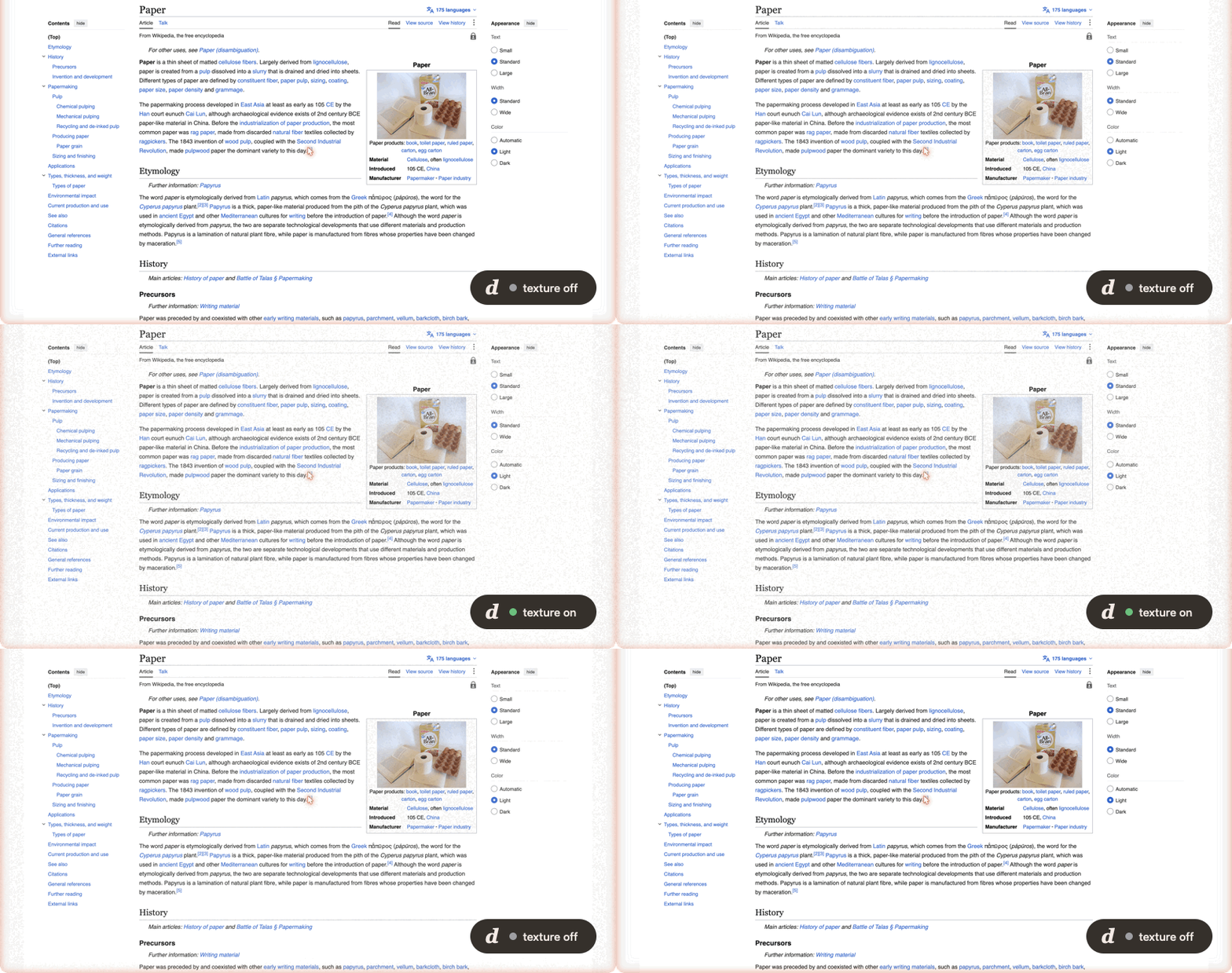
kelvanic.com/products/deckle A free, open-source macOS menu bar app that lays a subtle paper-grain texture over your entire screen**, making long reading and writing sessions feel more like paper than glass. Choose a paper, tune your desk, and save the whole setup for your next reading or writing session. > If Deckle makes your screen nicer, a star helps other people find it ⭐ A deckle is the wooden frame used in hand papermaking — it leaves behind the soft, feathered "deckle edge" that marks real handmade paper.* Not a calibrated blue-light filter — a *matte texture* overlay. Choose a smooth dimming veil or a textured finish; every pixel of your work stays interactive because the overlay is fully click-through. A software overlay does not change the glass’s physical reflectivity. Paper Mill reports estimated blue-channel reduction and contrast retention as design guidance, not a medical claim.
Deckle is built on open-source principles to guarantee security, privacy, and full reproducibility. All sensitive data transformations run locally on your hardware with zero telemetry or unexpected cloud dependencies.
Key Technical Features & Capabilities
Desk setups — start with Read, Write, or Unwind, or save up to eight named combinations (names up to 32 characters) of paper, intensity, grain size, grain strength, and matte finish. Applying a setup enables the paper and ends a snooze; display exclusions and app rules still apply. Right-click a setup to remove it. Setups reference your saved papers, so a deleted paper must be restored before its setup can be used. Saving and applying setups is unavailable while a Paper Mill draft is being previewed.: Streamlined desktop functionality optimized for macOS and Windows.
Compare original — temporarily see your bare screen without changing saved settings or a snooze. It ends when you choose Back to paper, pick another paper, switch tabs, or close the menu.: Streamlined desktop functionality optimized for macOS and Windows.
**A living dotted companion — Echo's six counter-rotating rings breathe around a pulsing core, with blinking eyes that follow the cursor and a spring squash on click. The native animation uses the geometry and motion parameters from the Cloudstudio reference. It pauses when the menu is hidden or Reduce Motion is enabled; the desktop overlay stays static.
A complete paper studio — the library has a swatch-gallery layout; all five controls tabs fit at once; Paper Mill groups draft controls with a pinned Save/Cancel bar. Illustrated headers fan gently on hover and respect Reduce Motion.: Streamlined desktop functionality optimized for macOS and Windows.
Paper-cut desktop pets — an opt-in companion layer with its own menu tab. Pets never follow a fixed loop: each draws a fresh seeded plan about once a minute.
***Miso* is a jointed ginger tabby that wanders the bottom of the screen. It sits up to watch your cursor, looks back over its shoulder, grooms a raised paw, stretches with a yawn, and kneads before napping in a loaf with drifting z's. When playful it also pounces, chases its tail, and gets the zoomies.**: Streamlined desktop functionality optimized for macOS and Windows.
***Tide* is a blue paper fish with pleated fins that drifts through the screen in slow loops. It darts and glides, loops the loop, stops to nibble, dozes as it sinks, barrel-rolls, and turns edge-on like a folded card.**: Streamlined desktop functionality optimized for macOS and Windows.
**A paper-first workspace — *Your desk* shows the Echo companion, a labelled paper sample, intensity and matte controls, and your setups; *Paper library* provides browsing and search; *Pets* manages the companions; *Controls and settings* replaces the menu content with grain, snooze, display, app-rule, and app settings.**: Streamlined desktop functionality optimized for macOS and Windows.
Supported Platforms: macOS 12.0+ (Apple Silicon M1-M4 & Intel x86_64), Windows 10/11 x64, Linux
System Requirements
Specification
Minimum Requirement
Recommended Specification
Operating System
macOS 12.0 Monterey / Windows 10 x64
macOS 14.0+ Sonoma / Windows 11 x64
Processor Architecture
Apple Silicon (M1+) or Intel Core i5 x64
Apple Silicon Unified Memory (M2/M3/M4)
Memory (RAM)
4 GB Unified RAM
8 GB+ High-Speed RAM
Storage Space
300 MB available local disk space
1 GB+ SSD storage
GPU Acceleration
Metal 2 / DirectX 12 compatible
Apple Neural Engine / Vulkan capable
Installation & Setup Guide
macOS Installation (Recommended)
1
Download the verified .dmg release installer directly from CookApps.
2
Open the disk image and drag Deckle.app into your /Applications folder.
3
Launch Deckle via Spotlight (Cmd + Space) or Launchpad.
Alternatively, install using Homebrew if available:
bash
brew install --cask deckle
Windows Installation
1
Download the official installer package (.exe / .msi).
2
Run the executable and follow the setup wizard.
3
Launch Deckle from the Start Menu or desktop shortcut.
Building from Source (Development Setup)
bash
git clone https://github.com/Kelvanic/deckle.git
cd deckle
pnpm install || cargo build --release
pnpm run build
How to Use & Workflow
1
Application Launch & Workspace: Open Deckle to load the responsive native workspace.
2
Configuration & Preferences: Press Cmd + , (macOS) or Ctrl + , (Windows) to configure hardware acceleration, custom directories, and display themes.
3
Primary Operation: Drag-and-drop source files or input parameters directly into the central window.
4
Execution & Export: Initiate the processing pipeline and verify output files saved directly to your chosen local directory.
Troubleshooting & Common Issues
Problem: macOS Gatekeeper displays *"App is damaged and can't be opened"* or unnotarized developer notice.
Root Cause: macOS quarantine flag set on binaries downloaded outside the Mac App Store.
Resolution: Open Terminal and run:
bash
xattr -cr /Applications/Deckle.app
Alternatively, navigate to System Settings > Privacy & Security and select Open Anyway.
Problem: High memory consumption during batch processing operations.
Root Cause: Large media buffers retaining uncompressed state.
Resolution: Adjust batch concurrency in settings or process assets in focused batches.
How to Use & Getting Started
## Installation & Setup Guide
### macOS Installation (Recommended)
1. Download the verified `.dmg` release installer directly from CookApps.
2. Open the disk image and drag **Deckle.app** into your `/Applications` folder.
3. Launch Deckle via Spotlight (`Cmd + Space`) or Launchpad.
Alternatively, install using Homebrew if available:
```bash
brew install --cask deckle
```
### Windows Installation
1. Download the official installer package (`.exe` / `.msi`).
2. Run the executable and follow the setup wizard.
3. Launch **Deckle** from the Start Menu or desktop shortcut.
### Building from Source (Development Setup)
```bash
git clone https://github.com/Kelvanic/deckle.git
cd deckle
pnpm install || cargo build --release
pnpm run build
```
Ready to run Deckle?
100% Free & Open-Source native desktop software. Star the repository to support development.