
Claude Statistics
Native macOS menu bar app for monitoring Claude Code session usage, token costs, and Anthropic subscription limits in real time.
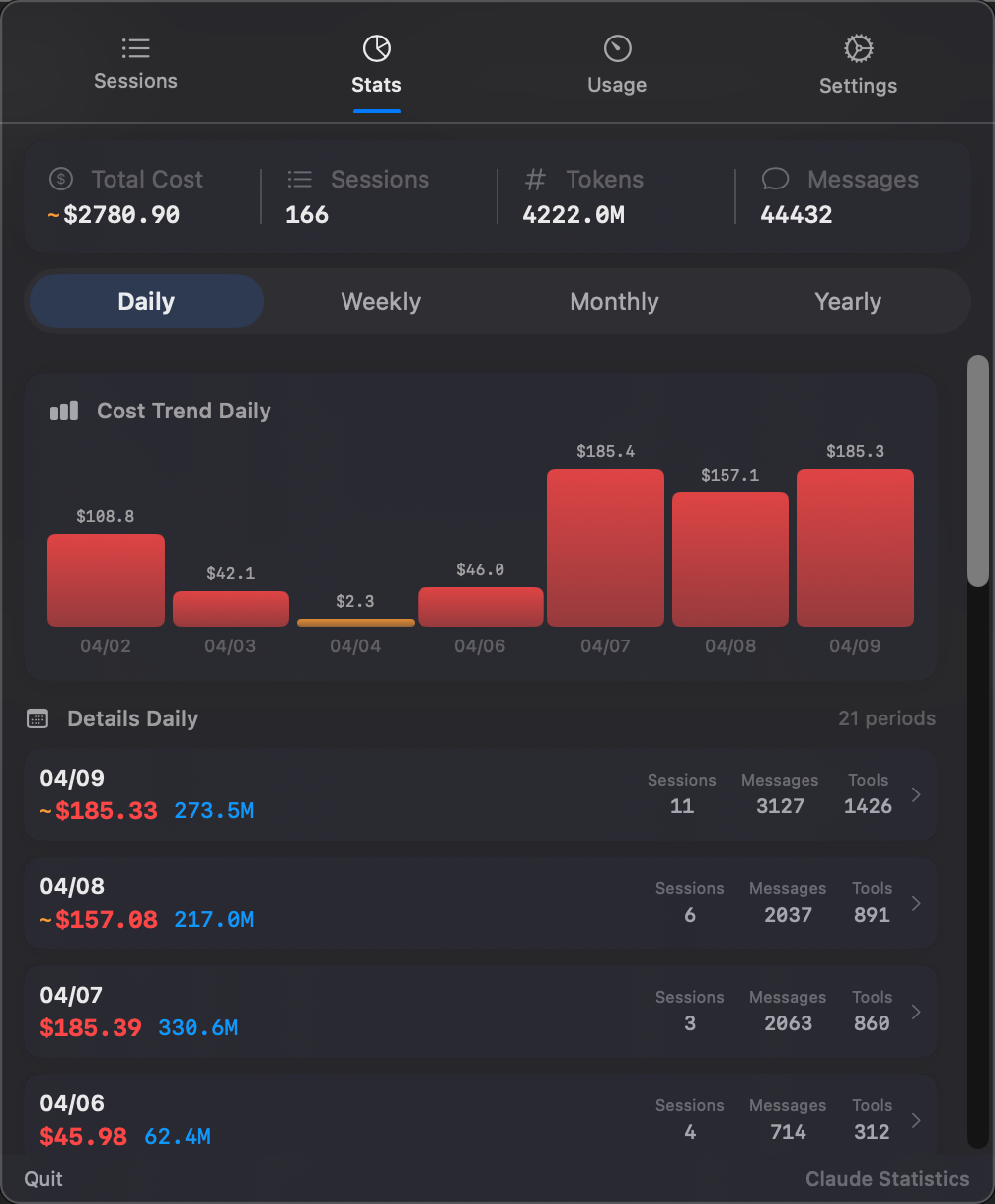
Claude Statistics
**中文文档**
A native macOS menu bar app for monitoring your Claude Code, Codex CLI, Gemini CLI, and marketplace-installed AI workflow plugins: sessions, subscription usage, accounts, tokens, and cost analytics in real time.
Current Highlights
.csplugin bundles from Settings → Plugins → Discover. The official catalog lives at [claude-statistics-plugins](https://github.com/sj719045032/claude-statistics-plugins).client_secret so refresh no longer silently fails with HTTP 400 client_secret is missing.Installation
Download DMG (Recommended)
Download the latest .dmg from Releases, open it, and drag Claude Statistics into Applications.
Because the app is not notarized by Apple, macOS may block the first launch. If that happens:
xattr -cr /Applications/Claude\ Statistics.app
Or right-click the app → Open → confirm Open in the dialog.
Build from Source
# Clone the repository
git clone https://github.com/sj719045032/claude-statistics.git
cd claude-statistics

# Generate Xcode project
xcodegen generate

# Open in Xcode
open ClaudeStatistics.xcodeproj
For local debug runs, use the provided script:
bash scripts/run-debug.sh
This script builds using the dedicated debug DerivedData path and relaunches the menu bar app safely.
Plugin Marketplace
Claude Statistics has a built-in marketplace for provider adapters, terminal/editor integrations, share-card extensions, and subscription endpoints.
.csplugin.zip, verify its SHA-256, unzip it, trust it, and hot-load it without restarting.provider, terminal (shown as Integrations), share-card, subscription, and utility.vendor maps to provider, while chat-app and editor-integration map to terminal.The public plugin catalog is maintained in [sj719045032/claude-statistics-plugins](https://github.com/sj719045032/claude-statistics-plugins). Plugin authors can publish .csplugin.zip assets on GitHub Releases and open a catalog PR with downloadURL, sha256, version, and permissions.
Screenshots
Conversation & Detail
| Session Detail | Transcript Search |
|---|---|
| !Session detail | !Transcript search |
Statistics
| Overview | Period Detail |
|---|---|
| !Statistics overview | !Statistics detail |
Usage
Features
Menu Bar Workflow
Claude Statistics lives in your macOS menu bar and opens as a floating panel.
Notch Island
A live activity surface docked to the MacBook notch (Dynamic Island–style; falls back to a top-screen pill on non-notch Macs). Turns claude / codex / gemini hook events into on-screen interactions so you never have to leave the notch to handle an approval or know what's running.
PermissionRequest hooks surface as inline Allow / Deny cards; decisions are written back through the hook protocol, no terminal switch neededReturn (or click) on a selected card jumps straight into that session's exact terminal tab. Precise-by-default routing:CGEventTap so the island doesn't steal key window from your terminal / editor mid-sessionSession Management
Claude Statistics automatically discovers and parses sessions from ~/.claude/projects/ (Claude Code), ~/.codex/projects/ (Codex CLI), and ~/.gemini/tmp/ (Gemini CLI). Each provider keeps its own parsing pipeline and local cache, so switching providers does not stop background indexing for the others.
Session List
Session Detail
Session Actions
Transcript Viewer & Search
Built-in transcript browsing for full conversation history.
Statistics & Cost Analytics
Analyze usage from the local transcript data you already have.
Subscription Usage Monitoring
Fetches provider-specific live usage data and combines it with local session analytics.
Provider Switcher
A compact switcher in the footer lets you toggle between providers at any time. Claude ships as the default chassis provider; Codex, Gemini, and future providers can be delivered as plugins.
~/.claude/projects/, fetches usage from Anthropic's OAuth API~/.codex/projects/, decodes profile from local JWT~/.gemini/tmp/, fetches usage from Gemini API, and exposes provider-specific grouped usage/trend viewsProviders that are not installed are hidden or disabled automatically depending on the current control.
Settings & Integrations
~/.claude/.credentials.jsonShare Cards
Generate beautiful, shareable stat cards from your session analytics.
UI & Interaction Details
Theme.swift)Requirements
project.yml)How It Works
Claude Statistics supports three providers, each with its own local-first data sources:
Claude Code
~/.claude/projects/Codex CLI
~/.codex/projects/Gemini CLI
~/.gemini/tmp/ and project roots from ~/.gemini/history/Plugin system
.csplugin bundles from the official marketplace catalog, the app bundle, or the user plugin folderClaudeStatisticsKitArchitecture
ClaudeStatistics/
├── App/                    # App entry, status bar controller, floating panel
├── Models/                 # Session, SessionStats, AggregateStats, UsageData, ShareRole, ShareMetrics, etc.
├── Providers/              # SessionProvider protocol + Claude, Codex, and Gemini implementations
│   ├── SessionProvider.swift
│   ├── Claude/             # ClaudeProvider, ClaudeSessionScanner, ClaudeTranscriptParser
│   ├── Codex/              # CodexProvider, CodexSessionScanner, CodexTranscriptParser
│   └── Gemini/             # GeminiProvider, GeminiSessionScanner, GeminiTranscriptParser
├── Services/               # Parsing, scanning, storage, pricing fetch, usage API, share metrics builder, logs
├── Utilities/              # Terminal launching, time formatting, language handling, share image exporter
├── ViewModels/             # SessionViewModel, UsageViewModel, ProfileViewModel
├── Views/                  # Sessions, statistics, usage, transcript, settings, theme, share cards
├── Resources/              # Localizable strings and assets
├── Plugins/                # ClaudeStatisticsKit SDK + first-party plugin targets
└── scripts/                # Debug build/run and DMG release helpers
Notable implementation details:
NSStatusItem for menu bar presenceStatusBarControllerTheme.swift design-token layer for shared styling and animationBuild & Release
Debug Run
bash scripts/run-debug.sh
This script:
/tmp/claude-stats-build DerivedData pathBuild DMG
bash scripts/build-dmg.sh 2.9.1
# Outputs:
#   build/ClaudeStatistics-2.9.1.dmg
#   build/ClaudeStatistics-2.9.1.zip           — full Sparkle update
#   build/releases-archive/*.delta             — incremental Sparkle updates
#   build/marketplace/*.csplugin.zip           — marketplace plugin artifacts
The script will:
build/releases-archive/ (historical ZIPs + deltas)appcast.xml via generate_appcast, including a`` block for every prior version still in the archive
.csplugin.zip artifacts with matching .sha256 filesgh release create command at the end with all required assets (DMG, full ZIP, every new .delta file, and plugin artifacts)
Incremental updates: first release ships full ZIPs only; starting from
the second release, existing users auto-download tiny .delta patches
(often < 1 MB). If build/releases-archive/ is empty on a fresh checkout,
seed it by downloading the most recent 2–3 shipped ZIPs from GitHub releases
before running build-dmg.sh. Version numbers must be pure dotted numeric
(2.9.1), otherwise Sparkle's version comparison can't rank them and delta
generation is skipped.
Publish a Release
# 1. Commit and push appcast / version updates
git add ClaudeStatistics.xcodeproj/project.pbxproj appcast.xml
git commit -m "chore: update appcast for vX.Y.Z"
git push

# 2. Switch to the publishing account
gh auth switch --hostname github.com --user sj719045032

# 3. Run the `gh release create` command the build script printed — it
#    already includes the DMG, the full ZIP, and every generated delta.

# 4. Switch back if needed
gh auth switch --hostname github.com --user tinystone007
Existing users receive updates through Sparkle's in-app updater — deltas when
possible, full ZIP as fallback.
Configuration
Model pricing is stored in ~/.claude-statistics/pricing.json and can be edited manually or from the Settings tab.
| Setting | Description |
|---|---|
| Launch at Login | Start Claude Statistics automatically on login |
| Auto Refresh | Refresh subscription usage data on an interval |
| Preferred Terminal | Terminal app used for resuming Claude sessions |
| Plugins | Browse Discover, install/update plugins, disable/uninstall user plugins, and reset trust decisions |
| Model Pricing | View, edit, or fetch latest model pricing |
| Status Line | Install/update Claude Code status line integration |
| Tab Order | Reorder the main tabs |
| Language | Auto / English / Simplified Chinese |
| Font Scale | Adjust panel content scale |
| Diagnostics | Open/export app logs |
Credits & Acknowledgments
Claude Statistics stands on the shoulders of excellent open source work and
community projects. Huge thanks to:
Inspiration
— architectural inspiration for the notch notifications layer (local socket
model, notch-shape rendering, hook installer idempotency). We re-implemented
the ideas independently; no code is copied.
— inspiration for the terminal-focus playbook (`AppleScript → AX →
NSRunningApplication.activate` layered fallback, TTY variant normalization).
Ideas only, no code copied.
Core dependencies
framework powering in-app upgrades, delta patches, and EdDSA-signed appcasts.
Markdown rendering inside the notch cards and session detail view (brings
along cmark-gfm, Highlightr, LaTeXSwiftUI, MathJaxSwift,
HTMLEntities, SwiftDraw, and swift-markdown).
privacy-respecting anonymous usage analytics (no personal data collected).
Platform / tooling
**OpenAI Codex CLI**, and
— the three coding assistants this app reads, tracks, and augments.
.xcodeproj regeneratable from project.yml.
If you spot an open source project we're using but haven't credited here,
please open an issue — we're happy to add it.
Star History
[
](https://www.star-history.com/?repos=sj719045032%2Fclaude-statistics&type=date&legend=top-left)
License
MIT
How to Use & Getting Started
Ready to run Claude Statistics?
100% Free & Open-Source native desktop software. Star the repository to support development.
More in system-utilities
View all system-utilities apps →
Plonk
Ten menu bar utilities in one app: a window manager with snap zones you draw yourself, workspaces that reopen your apps on the right monitor, on-device ...

Kawa
Better input source switcher for macOS.

WhatCable
Tells you, in plain English, what each USB-C cable plugged into your Mac can do - speed, power, and e-marker info - from the menu bar.