Overview
Aman Disk is an advanced, high-performance desktop application engineered for seamless native performance, local-first data processing, and refined user experience.
Aman Disk is built on open-source principles to guarantee security, privacy, and full reproducibility. All sensitive data transformations run locally on your hardware with zero telemetry or unexpected cloud dependencies.
Key Technical Features & Capabilities
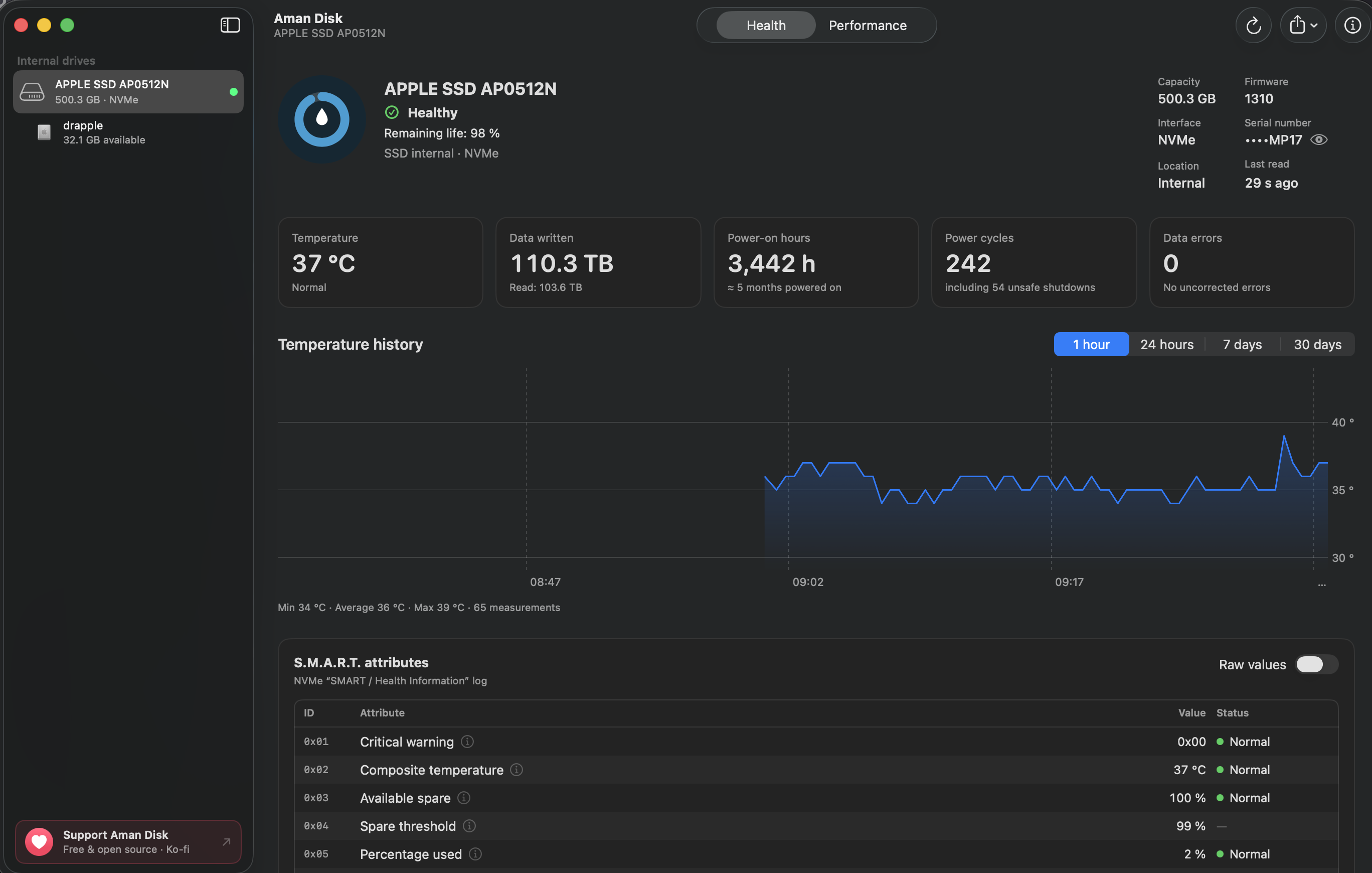
Internal & external drive health: reads S.M.A.R.T. data from internal NVMe SSDs, Apple PCIe AHCI SSDs, SATA drives, external Thunderbolt/USB4 NVMe SSDs, and external USB SATA enclosures (via open-source SAT SMART Driver), with a clear status (“Healthy”, “Needs attention”, “Likely failing”, or “Health unknown” when the drive returns empty or unverified data) and remaining life when reported. Temperature alone never changes the status.
Hardware details without S.M.A.R.T.: for USB drives where macOS restricts S.M.A.R.T. access, displays bridge chip vendor, USB link speed, transport protocol (UAS / BOT), volumes, and a calm, non-alarming explanation.
Attributes explained: every S.M.A.R.T. attribute has a readable name and an explanation; values are converted to their unit (°C, hours, TB), or shown as raw hexadecimal on request.
Continuous temperature history: one reading every 30 seconds, kept at full resolution for 24 hours, then as 5-minute averages for 30 days. External drives regain their history upon reconnection via SHA-256 fingerprint hashing.
Performance benchmark: sequential and random reads and writes for internal and external drives, with live link throughput comparisons (e.g. USB 5 Gb/s vs Thunderbolt). The test file is always cleanly removed, even on mid-test disconnection.
Menu bar: status and temperature of internal and connected external drives separated by a clean divider, with the last hour's curve.
Live Dock icon: the ring around the icon follows the health of the startup boot drive.
Alerts: notifications when a readable drive changes status, stays too hot, or drops below 50%, 25% or 10% of its life (disabled by default; zero false alerts on hot-unplug).
Architecture & Technology Stack
Frameworks & UI Runtime: SwiftUI / AppKit
Build Systems & Tooling: Xcode / Node.js / Cargo
Supported Platforms: macOS 12.0+ (Apple Silicon M1-M4 & Intel x86_64), Windows 10/11 x64, Linux
System Requirements
| Specification | Minimum Requirement | Recommended Specification |
|---|
| Operating System | macOS 12.0 Monterey / Windows 10 x64 | macOS 14.0+ Sonoma / Windows 11 x64 |
| Processor Architecture | Apple Silicon (M1+) or Intel Core i5 x64 | Apple Silicon Unified Memory (M2/M3/M4) |
| Memory (RAM) | 4 GB Unified RAM | 8 GB+ High-Speed RAM |
| Storage Space | 300 MB available local disk space | 1 GB+ SSD storage |
| GPU Acceleration | Metal 2 / DirectX 12 compatible | Apple Neural Engine / Vulkan capable |
Installation & Setup Guide
macOS Installation (Recommended)
1Download the verified .dmg release installer directly from CookApps.
2Open the disk image and drag Aman Disk.app into your /Applications folder.
3Launch Aman Disk via Spotlight (Cmd + Space) or Launchpad.
Alternatively, install using Homebrew if available:
brew install --cask aman-disk
Windows Installation
1Download the official installer package (.exe / .msi).
2Run the executable and follow the setup wizard.
3Launch Aman Disk from the Start Menu or desktop shortcut.
Building from Source (Development Setup)
git clone https://github.com/MidZai/aman_disk.git
cd aman_disk
pnpm install || cargo build --release
pnpm run build
How to Use & Workflow
1Application Launch & Workspace: Open Aman Disk to load the responsive native workspace.
2Configuration & Preferences: Press Cmd + , (macOS) or Ctrl + , (Windows) to configure hardware acceleration, custom directories, and display themes.
3Primary Operation: Drag-and-drop source files or input parameters directly into the central window.
4Execution & Export: Initiate the processing pipeline and verify output files saved directly to your chosen local directory.
Troubleshooting & Common Issues
Problem: macOS Gatekeeper displays *"App is damaged and can't be opened"* or unnotarized developer notice.
Root Cause: macOS quarantine flag set on binaries downloaded outside the Mac App Store.
Resolution: Open Terminal and run:
xattr -cr /Applications/Aman Disk.app
Alternatively, navigate to System Settings > Privacy & Security and select Open Anyway.
Problem: High memory consumption during batch processing operations.
Root Cause: Large media buffers retaining uncompressed state.
Resolution: Adjust batch concurrency in settings or process assets in focused batches.