Desktop app for Claude Code and Codex that shows every agent and subagent live, searches your coding-agent history and runs agents on local models.
SHARE
Screenshots (5)
Screenshot 1 of 5
Overview
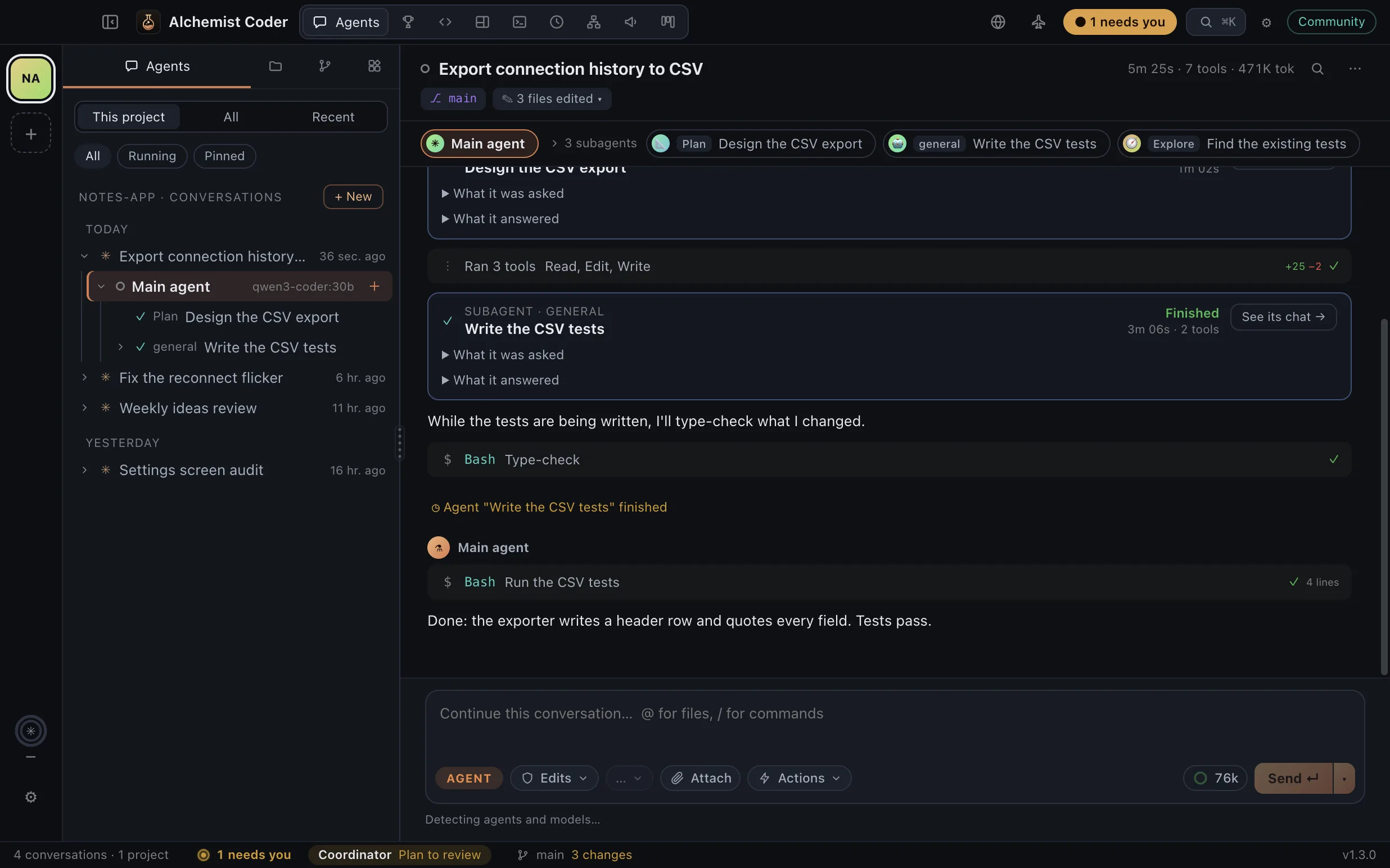
The lab for your coding agents.** A free, open-source desktop app for Claude Code and Codex. Follow every agent and every subagent it spawns, live. Give work to your own organization of agents, let them drive a browser while you watch, or put them on Autopilot. Search every conversation you've had with Claude Code, Codex, Gemini CLI and Grok Build.     Download** · Website · What's new in 1.3.8 · Ideas and questions · Español Real screens with a demo project; the agents run on local models. If it's useful to you, a star helps other people find it. > Version 1.3.8, in English, Español, Português, Français, Deutsch, Italiano, Русский, 日本語, 한국어, 简体中文 and हिन्दी. Download for macOS (Apple Silicon or Intel), Windows or Linux (AppImage or .deb), or from Releases. The builds aren't signed with an Apple or Microsoft certificate yet. The first time on a Mac, macOS says it can't verify the app: click Done, then open System Settings → Privacy & Security and click Open Anyway. On Windows, if SmartScreen warns you, choose More info → Run anyway. Feedback and issues are welcome.
Alchemist Coder is built on open-source principles to guarantee security, privacy, and full reproducibility. All sensitive data transformations run locally on your hardware with zero telemetry or unexpected cloud dependencies.
Key Technical Features & Capabilities
Autopilot (new in 1.3). One switch in the title bar and your agents stop waiting for you: permissions are allowed once, questions go back to the agent to decide, and plans and automation steps are approved for you. What can't be undone (sudo, force-pushes, publishing to npm, cargo, GitHub releases, the stores or Docker, wiping a disk) is always refused. The Coordinator has its own "Decides everything" switch for the organization, and saves a short lesson after each mistake that every later prompt carries.
A browser your agents drive (new in 1.3). The globe in the title bar opens a browser next to the conversation. Every agent gets tools to open, read, click, type, scroll and screenshot pages, the pane says which agent is driving, and "Take over" makes it wait until you hand it back. New in 1.3.1: tabs, and a browser of its own for each project, with its own cookies and sign-ins, so one project's agents never see another's pages. New in 1.3.6: agents can read only the part of a page that mentions what they're looking for, instead of the whole page. New in 1.3.7: sign in once — a project's browser offers the sign-ins you already have in your other projects, one site at a time, so you don't sign in to Google or your Apple ID again in every project.
Google Play, App Store Connect and AdMob, built in. Agents get tools for the stores through their official APIs instead of driving the consoles in a browser: listings, .aab uploads, tracks and staged rollouts, Android vitals, versions, builds and App Review submission, reviews and replies, sales and AdMob earnings. Everything that changes something is a dry run until you approve it. Set up a service once with app-console-mcp (appconsole config set …) and every agent and automation gets its tools; services you haven't set up add nothing. Needs uv.
Attach any file (new in 1.3). Drop, paste or pick PDFs, spreadsheets, archives, audio, video or code; agents open each file with their own tools.: Streamlined desktop functionality optimized for macOS and Windows.
**One history for all four agents. Indexes Claude Code (~/.claude/projects), Codex (~/.codex/sessions), Gemini CLI (~/.gemini/tmp/*/chats) and Grok Build (~/.grok/sessions) into a local SQLite index with full-text search. Your original files are only read, never modified.**: Streamlined desktop functionality optimized for macOS and Windows.
Keep every conversation. Claude Code deletes transcripts after 30 days by default; the opt-in versioned backup mirrors your Claude Code and Codex history into a git repository you choose, and conversations the CLIs delete stay in the app. Export any conversation, subagents included, to Markdown, HTML or JSON.: Streamlined desktop functionality optimized for macOS and Windows.
An organization of agents. A standing coordinator takes your assignments, plans them (review the plan first if you like) and hands the work to the agents you add over time, each with its own little monster (or a picture you choose), role and instructions, model, permissions and projects. Write what you need once, in one box: you stay on the organization chart, where each agent's card shows its task and what it's doing right now, and you approve the plan right there. Drag an agent onto another to put it on its team. A "Needs you" inbox gathers their questions, permission requests and plans, and each agent keeps a record of what it did.
In 11 languages. English, Spanish, Brazilian Portuguese, French, German, Italian, Russian, Japanese, Korean, Simplified Chinese and Hindi: the app, its menus and what automations say. It follows your system's language, or pick one in Settings.
Architecture & Technology Stack
Primary Languages: Rust, TypeScript
Frameworks & UI Runtime: Tauri 2
Build Systems & Tooling: Cargo, pnpm / npm
Supported Platforms: macOS 12.0+ (Apple Silicon M1-M4 & Intel x86_64), Windows 10/11 x64, Linux
System Requirements
Specification
Minimum Requirement
Recommended Specification
Operating System
macOS 12.0 Monterey / Windows 10 x64
macOS 14.0+ Sonoma / Windows 11 x64
Processor Architecture
Apple Silicon (M1+) or Intel Core i5 x64
Apple Silicon Unified Memory (M2/M3/M4)
Memory (RAM)
4 GB Unified RAM
8 GB+ High-Speed RAM
Storage Space
300 MB available local disk space
1 GB+ SSD storage
GPU Acceleration
Metal 2 / DirectX 12 compatible
Apple Neural Engine / Vulkan capable
Installation & Setup Guide
1 Redit
macOS Installation (Recommended)
1
Download the verified .dmg release installer directly from CookApps.
2
Open the disk image and drag Alchemist Coder.app into your /Applications folder.
3
Launch Alchemist Coder via Spotlight (Cmd + Space) or Launchpad.
Alternatively, install using Homebrew if available:
bash
brew install --cask alchemist-coder
Windows Installation
1
Download the official installer package (.exe / .msi).
2
Run the executable and follow the setup wizard.
3
Launch Alchemist Coder from the Start Menu or desktop shortcut.
Building from Source (Development Setup)
bash
git clone https://github.com/Alekla0126/alchemist-coder.git
cd alchemist-coder
pnpm install || npm install
pnpm run build || npm run build
Installation & Setup Guide
Mở khóa ứng dụng để xem chi tiết hướng dẫn cài đặt, cấu hình môi trường và vận hành.
How to Use & Workflow
1 Redit
1
Application Launch & Workspace: Open Alchemist Coder to load the responsive native workspace.
2
Configuration & Preferences: Press Cmd + , (macOS) or Ctrl + , (Windows) to configure hardware acceleration, custom directories, and display themes.
3
Primary Operation: Drag-and-drop source files or input parameters directly into the central window.
4
Execution & Export: Initiate the processing pipeline and verify output files saved directly to your chosen local directory.
How to Use & Workflow
Mở khóa ứng dụng để xem chi tiết hướng dẫn cài đặt, cấu hình môi trường và vận hành.
Troubleshooting & Common Issues
Problem: macOS Gatekeeper displays *"App is damaged and can't be opened"* or unnotarized developer notice.
Root Cause: macOS quarantine flag set on binaries downloaded outside the Mac App Store.
Resolution: Open Terminal and run:
bash
xattr -cr /Applications/Alchemist Coder.app
Alternatively, navigate to System Settings > Privacy & Security and select Open Anyway.
Problem: High memory consumption during batch processing operations.
Root Cause: Large media buffers retaining uncompressed state.
Resolution: Adjust batch concurrency in settings or process assets in focused batches.
How to Use & Getting Started
Protected
## Installation & Setup Guide
### macOS Installation (Recommended)
1. Download the verified `.dmg` release installer directly from CookApps.
2. Open the disk image and drag **Alchemist Coder.app** into your `/Applications` folder.
3. Launch Alchemist Coder via Spotlight (`Cmd + Space`) or Launchpad.
Alternatively, install using Homebrew if available:
```bash
brew install --cask alchemist-coder
```
### Windows Installation
1. Download the official installer package (`.exe` / `.msi`).
2. Run the executable and follow the setup wizard.
3. Launch **Alchemist Coder** from the Start Menu or desktop shortcut.
### Building from Source (Development Setup)
```bash
git clone https://github.com/Alekla0126/alchemist-coder.git
cd alchemist-coder
pnpm install || npm install
pnpm run build || npm run build
```
How to Use & Getting Started
Unlock this app with 1 Redit to access verified runbooks and usage workflows.
Ready to run Alchemist Coder?
100% Free & Open-Source native desktop software. Star the repository to support development.